You know how frustrating it gets when your screening operations slow down. Screen blinding can sneak up on you fast. You start to see dirt and fines covering the screen openings. Pegging and blinding both block those openings. This drops your throughput and hurts your efficiency. Sometimes, your product gradations shift out of spec. If you manage a plant or run the screens, you need fixes that work—quick.
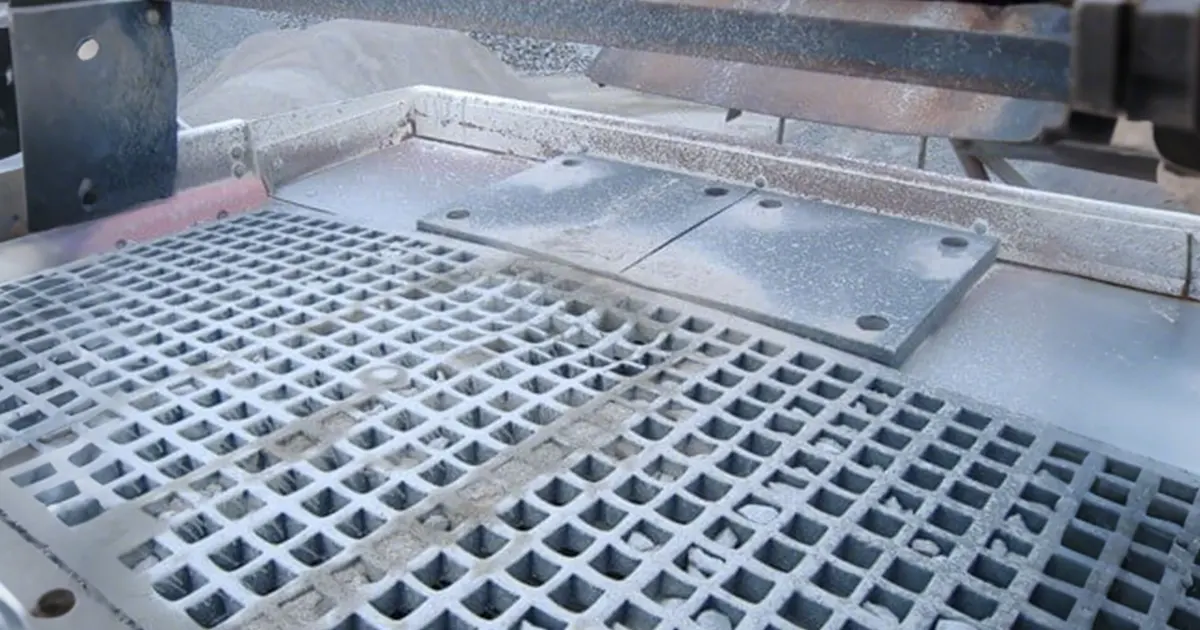
- Blinding limits performance by covering up the screen.
- Blocked openings mean lower screening efficiency.
- Pegging and blinding can cut production and cause downtime.
Key Takeaways
- Screen blinding and pegging can slow work and lower efficiency. Finding these problems early is very important.
- Blinding happens when small or sticky stuff covers the screen. Pegging happens when bigger pieces get stuck in the holes.
- Checking screens often helps find blocked holes or uneven flow before things get worse.
- Changing how fast you feed material and how deep the bed is can help the screen work better. This also lowers blinding and pegging.
- Using self-cleaning screens or ball trays helps clear stuck stuff and keeps things moving.
- Picking the right screen media matters. Self-cleaning screens are good for sticky stuff. Woven wire screens are better for dry stuff.
- Keeping vibration settings right is important. Not enough vibration can cause blinding. Too much vibration can make material bounce off.
- Doing regular maintenance and quick fixes stops downtime and keeps your plant working well.
Quick Answers
Identify Blinding & Pegging
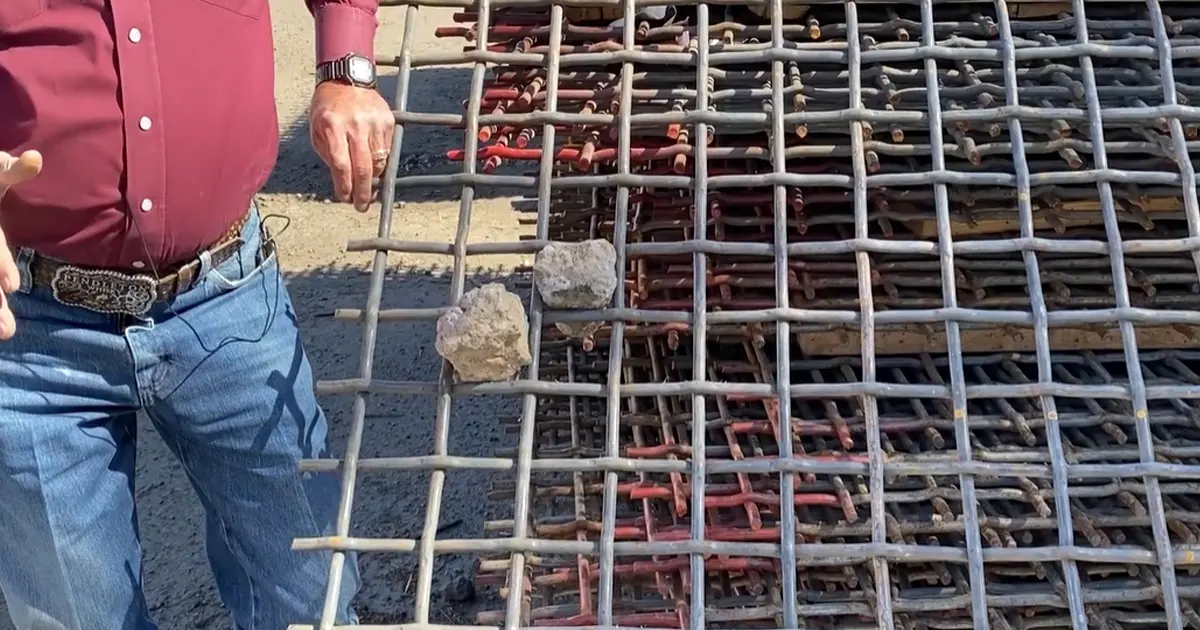
You want to spot problems early. Screen blinding and pegging look different, but both slow down your process. Blinding happens when fine material or sticky particles cover the screen openings. You might see a layer of dirt or clay that blocks the holes. Pegging means larger particles get stuck inside the openings. These chunks wedge in and refuse to shake loose.
Here’s how you can tell the difference:
- Blinding covers the surface with a film or layer.
- Pegging jams individual holes with stuck particles.
- Blinding usually builds up slowly. Pegging can happen fast, especially with near-size or odd-shaped material.
If you notice a drop in throughput or see uneven product sizes, check your screens for these symptoms.
Diagnose Issues
You need to figure out what’s causing the trouble. Start with a quick inspection. Look for blocked openings and check if the material is wet or sticky. Moisture often makes blinding worse. If you see lots of stuck particles, pegging might be the main issue.
Plant managers and engineers often ask:
- What methods can be used to prevent screen blinding and pegging?
- How does moisture affect the performance of screen media?
- What features can assist in keeping screens clear of blinding or pegging material?
You should also check your vibration settings. Low vibration can let material settle and block the screen. High moisture or clay content can make blinding worse. If you use woven wire screens, look for signs of wear or loose tension.
Tip: Use a flashlight to spot blocked holes. Wet material often looks shiny or sticky.
Fast Process Fixes
You want quick solutions that work. Try these steps:
- Increase the speed or stroke of your screen. This shakes loose stuck material.
- Use ball trays under the screen deck. Balls bounce and knock free collected fines.
- Install heated decks if moisture is a problem. Heat dries and loosens stuck particles.
- Adjust your feed rate. Too much material can overload the screen and cause blinding.
- Spray bars can help wash away sticky fines.
You can also switch to self-cleaning screen media. These screens flex and move, helping to clear blinding and pegging. If you see repeated problems, review your screen tension and check for worn panels.
Note: Quick fixes keep your plant running, but regular checks prevent bigger problems.
Media Selection
Choosing the right screen media can make or break your screening process. If you pick the wrong type, you might see more blinding or pegging. The right choice keeps your screens clear and your plant running smooth.
Let’s break down your main options:
- Woven Wire Screens
These screens work well for most dry, clean materials. You get good accuracy and high open area. If you deal with sticky or wet material, you might see more blinding. Pegging can also happen with near-size particles. - Self-Cleaning Screens
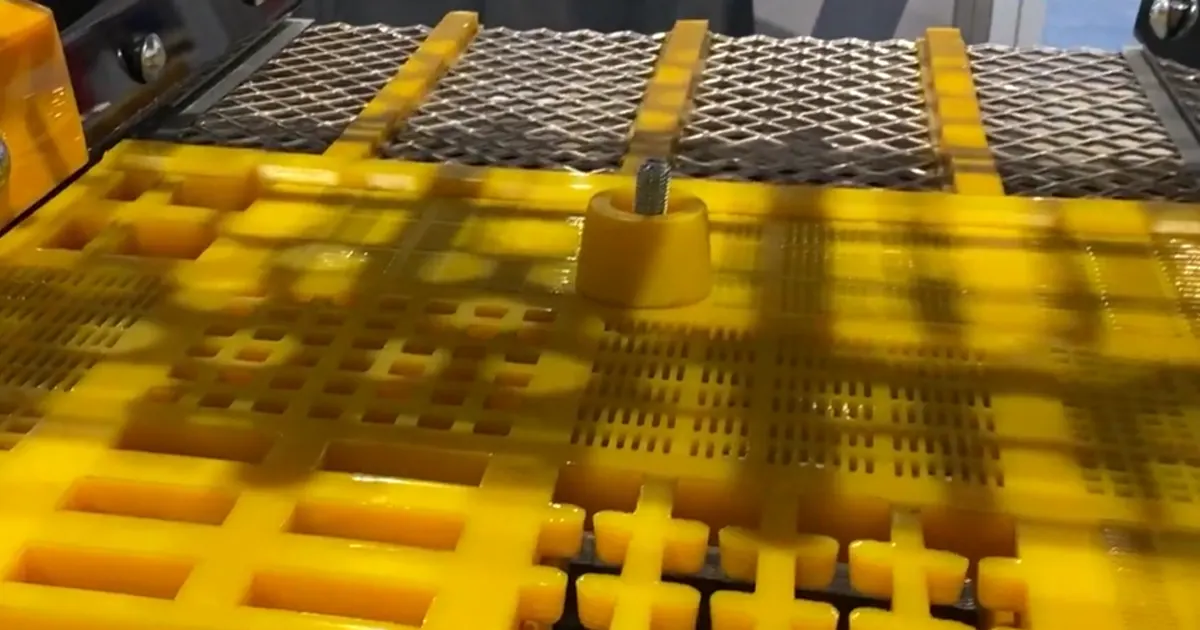
These screens use wires that move and flex. The motion helps shake off fines and stuck particles. You see less blinding and pegging. They work great if you handle tough, sticky, or wet material. You might pay more up front, but you save time on cleaning and maintenance. - Polyurethane (PU) or Urethane Panels
These panels last a long time. They resist wear and handle heavy loads. If you screen abrasive or sharp material, PU panels can help. They also reduce noise. Sometimes, the open area is lower than wire screens. You might see more blinding if the material is very fine or sticky. - Perforated Plate
This option gives you strong, durable screens. You use them for heavy-duty jobs. They can handle large rocks or sharp material. The holes can clog if you run wet or sticky feed.
Here’s a quick table to help you compare:
| Media Type | Best For | Blinding Risk | Pegging Risk | Durability | Cost |
|---|---|---|---|---|---|
| Woven Wire | Dry, clean material | Medium | Medium | Medium | $ |
| Self-Cleaning | Wet, sticky, tough | Low | Low | Medium | $$ |
| PU/Urethane Panels | Abrasive, heavy loads | Medium-High | Low | High | $$$ |
| Perforated Plate | Large, sharp material | High | Medium | Very High | $$ |
Tip: If you see frequent blinding or pegging, try self-cleaning screens first. They solve most problems fast.
When you pick screen media, think about your material. Is it wet or dry? Is it sticky or sharp? Do you need long life or high accuracy? You can also mix media types on one deck. For example, use self-cleaning screens in trouble spots and wire screens elsewhere.
You should check your screens often. If you see blinding or pegging, swap out panels or try a new media type. Don’t wait for a shutdown. A quick change can boost your throughput and save you hours of cleaning.
Remember, the right screen media keeps your plant running and your product on spec. Choose smart, and you’ll see the difference.
Screen Blinding & Pegging Defined
People talk a lot about screen blinding and pegging in screening plants. These problems can slow down your plant. They also hurt your product quality. Let’s look at what each one means and how you can spot them.
Pegging happens when rocks get stuck in the screen openings. This lowers how much material you can screen. Blinding often increases with moisture and fines/clay content, but it can also be driven by sticky coatings, fibrous contamination, or insufficient stratification.
Screen Blinding Symptoms
Screen blinding happens when small or sticky particles cover the screen. You might see a thin layer of dirt or clay. Wet fines can also block the holes. This layer stops material from going through. You see fewer open holes, and your throughput drops.
Here are some things you might notice:
- A film or coating on the screen
- Wet or sticky stuff stuck to the mesh
- Not as many open holes as before
- Production rates get slower
You may also see your product sizes change. The screen can’t separate material as well. You spend more time cleaning. Your costs go up. If you ignore screen blinding, your screens can get damaged. You also lose more efficiency.
| Symptoms/Impacts | Description |
|---|---|
| Low Efficiencies | Particles get stuck in the holes and lower throughput. |
| Slowed Production Rates | You need to clean more, so production slows down. |
| Additional Costs | Cleaning and fixing screens costs more money. |
Screen Pegging Symptoms
Screen pegging looks different from blinding. Instead of a film, you see big pieces stuck in the holes. These chunks get wedged in tight and won’t come out. Pegging usually happens fast. It is common with odd-shaped or near-size material.
Look for these signs:
- Holes blocked by rocks or chunks
- Material stuck deep in the openings
- The flow across the screen is uneven
- Screening efficiency drops suddenly
Pegging can make your capacity drop quickly. You might see more big pieces in your product. The screen can’t do its job. You may have to stop and clean the screen.
Comparison Table
Let’s compare screen blinding and pegging side by side. This table shows the main differences in causes and what happens to your plant.
| Issue | Cause | Operational Consequences |
|---|---|---|
| Pegging | Particles get wedged in the holes because of their size and shape | Screening efficiency goes down |
| Blinding | Fine particles stick together and to the screen because of moisture | The screened product can get contaminated |
Both problems fill up the screen openings. When this happens, you lose open area. Your plant slows down. Blinding builds up slowly. Pegging can happen fast. You need to fix both problems quickly to keep things running.
If you see blinding or pegging, try self-cleaning screens, spray bars, or change your vibration settings. These steps help clear the holes and improve your throughput.
Root Causes
You want to keep your screens running smoothly. To do that, you need to know what causes blinding and pegging in the first place. Let’s break down the main reasons into three groups: material factors, operating factors, and media factors.
Material Factors
The type of material you feed into your screen can make or break your process. Some materials just love to cause trouble.
Moisture & Fines
Moisture is a big problem for screens. When your feed is wet, fine particles stick together and coat the screen. This leads to screen blinding. If you work with finer materials, you’ll notice the problem gets worse as moisture goes up.
Here’s a quick look at how moisture content affects blinding:
| Moisture Content | Impact on Screen Blinding |
|---|---|
| High | Increased incidents |
| Low | Fewer incidents |
| Finer Materials | More significant impact |
If you see sticky, wet fines, you can expect more cleaning and less throughput. You might also notice that your open area shrinks fast.
Clay & Near-Size
Clay is another troublemaker. It acts like glue and sticks to everything. When you have clay in your feed, it can coat the screen and fill up the holes. Near-size particles—those that are almost the same size as your screen openings—also cause pegging. They wedge themselves in and refuse to budge.
- Clay increases the risk of blinding by sticking to the mesh.
- Near-size particles get stuck and cause pegging.
- Both problems reduce your open area and slow down your process.
Particle Shape
The shape of your material matters more than you think. Round particles move through screens easily. Odd shapes, like flat or angular pieces, get stuck more often. If your feed has lots of weird shapes, you’ll see more pegging.
| Evidence Type | Description |
|---|---|
| Particle Shape | Spherical, angular, and tabular shapes interact differently with screen holes. |
| Size Distribution | Particles must be the right size to pass through; too close to the opening size, they get stuck. |
| Screening Analysis | Standard wire mesh sieves help you check size distribution and pegging risk. |
Tip: If you see lots of odd-shaped rocks or a wide range of sizes, check your screens more often.
Operating Factors
How you run your screen can make a huge difference. Even the best screen can fail if you don’t set it up right.
Feed & Bed Depth
Feed rate is key. If you dump too much material on the screen, it forms a thick bed. Fines have to travel farther to reach the openings. This makes blinding and pegging more likely.
| Factor | Description |
|---|---|
| Feed Rate | High feed rates create a thick bed, making it harder for fines to pass through and increasing blinding. |
You want to keep your bed depth just right. Too thick, and you lose efficiency. Too thin, and you might not use the full screen area.
Stratification
Stratification means the material layers itself as it moves across the screen. Good stratification lets fines reach the bottom and pass through. Poor stratification keeps fines on top, where they can’t get through the holes.
- If you see fines riding on top, your stratification needs work.
- Adjust your vibration or feed rate to help fines settle.
Vibration Settings
Vibration is your friend—if you set it right. The right frequency and intensity help move material and clear stuck particles. Too little vibration lets material settle and block the screen. Too much can bounce material off before it gets screened.
| Factor | Description |
|---|---|
| Vibration Frequency | Higher frequencies help with fine screening. |
| Vibration Intensity | Enough vibration prevents pegging and blinding, but too much can cause material to bounce off. |
Note: If you keep having problems, check your vibration settings first. Small tweaks can make a big difference.
Media Factors
The screen media you choose affects everything. The wrong choice can lead to more downtime and higher costs.
Aperture Shape
The shape of the holes in your screen matters. Square holes work for most materials, but they can trap near-size particles. Slots help reduce pegging by letting odd-shaped pieces pass through more easily.
- Square apertures are good for accuracy but can peg with near-size material.
- Slot apertures help reduce pegging and keep material moving.
Wire Diameter
A balance between open area and wire diameter is crucial. Thicker wires last longer but reduce open area. Less open area means more blinding and pegging, especially with delicate materials.
- Thicker wires = more strength, less open area.
- Less open area = higher risk of clogging.
Tension
Loose screens cause trouble. If your screen isn’t tight, material can bounce and settle in the holes. This leads to both blinding and pegging. Always check your tension during maintenance.
“Not choosing a screen media suitable for an individual application could mean unexpected breaks, ruined piles from contamination and overall expensive downtime. The high-vibration qualities also tend to go far in solving issues with blinding and pegging.”
Flexible polyurethane or rubber screens can help. Their smooth, elastic surfaces make it harder for particles to get stuck. Polyurethane mesh designs also help reduce blinding and pegging, keeping your process efficient.
- Polyurethane and rubber screens flex and shake off stuck particles.
- The right media choice keeps your plant running and your product on spec.
If you want to avoid screen blinding and pegging, pay close attention to your material, how you run your screen, and the media you use. Small changes in any of these areas can make a big difference in your screening results.
Diagnosis Checklist
Visual Inspection
You can spot many screening problems just by looking. Start with a walk around your screen. Use a flashlight to check the surface. Look for blocked holes, stuck rocks, or a layer of wet fines. If you see shiny or sticky spots, you might have blinding. If you see big chunks jammed in the holes, pegging is likely.
Touch the screen panels. Feel for loose tension or worn spots. Listen for odd noises. A rattling sound can mean loose panels. If you notice uneven material flow, that’s a sign something’s wrong. You can also watch for dust clouds or wet patches. These clues help you find trouble fast.
Sometimes, you need a deeper look. Certified technicians can do on-site inspections. They check for hidden problems and show you how to install screen media the right way. You can learn a lot from their tips.
Tip: Make visual checks part of your daily routine. You’ll catch problems before they get worse.
Open Area Measurement
The open area is the part of the screen that lets material pass through. If too many holes get blocked, your throughput drops. You can measure open area with a simple tool or even a ruler. Count the number of open holes in a small section. Compare it to the total number of holes. If you see a lot of blocked spots, you need to act.
Some plants use wireless sensors to measure key performance indicators like orbit and acceleration. These sensors give you real-time data. You can spot changes before they cause downtime. Vibration analysis software also helps. It tracks screen performance and alerts you to problems early.
Here’s a quick table of common diagnostic tools:
| Diagnostic Tool | What It Does |
|---|---|
| Ruler or gauge | Measures open area directly |
| Wireless sensors | Tracks performance in real time |
| Vibration analysis software | Monitors screen health and finds issues early |
If you want expert advice, ask an OEM-certified technician to review your data. They can give you a summary and suggest fixes.
Bed Depth Check
Bed depth means how thick the layer of material is on your screen. If the bed is too deep, fines can’t reach the openings. If it’s too thin, you waste screen area. You can check bed depth with a simple stick or gauge. Push it into the material and see how deep it goes.
Watch the material as it moves. If you see fines riding on top, your bed is too thick. If you see bare screen, the bed is too thin. Adjust your feed rate to keep the bed just right.
Note: The right bed depth keeps your screen working at its best. Check it often, especially after changing your feed or screen settings.
By using these simple checks, you can keep your screens clear and your plant running smooth. Regular diagnosis saves you time and money.
Vibration Test
You might not think about vibration every day, but it plays a huge role in how well your screens work. If your screen shakes the right way, it keeps material moving and helps clear out blinding and pegging. If the vibration is off, you’ll see more problems and less throughput.
Start with a simple check. Stand near your screen while it’s running. Do you feel a strong, steady shake? Or does it seem weak or uneven? Sometimes, you can even hear the difference. A healthy screen makes a steady humming sound. If you hear rattling, banging, or odd noises, something could be wrong.
You can use a handheld vibration meter to get more details. Place the meter on the side of the screen frame. It will show you the vibration frequency (how fast it shakes) and amplitude (how much it moves). Most screens have a recommended range. If your numbers fall outside this range, you may need to adjust your settings.
Here’s a quick checklist for your vibration test:
- Check for steady, even shaking across the whole screen.
- Listen for unusual sounds like rattling or banging.
- Use a vibration meter to measure frequency and amplitude.
- Compare your readings to the manufacturer’s specs.
- Look for loose bolts or worn springs.
Tip: If you see material bouncing off the screen or piling up in one spot, your vibration settings might be wrong.
Sometimes, you’ll notice that blinding or pegging happens more on one side of the screen. This could mean the vibration isn’t balanced. Uneven vibration can cause material to move in the wrong direction or settle in the holes. You might need to adjust the counterweights or check for worn parts.
If you don’t have a vibration meter, you can still do a basic test. Place a small coin or washer on the frame. Watch how it moves. If it jumps around in a steady pattern, your vibration is probably good. If it barely moves or bounces all over, you may have a problem.
Note: Always turn off and lock out the screen before you tighten bolts or replace parts. Safety comes first.
Regular vibration tests help you catch problems early. You’ll keep your screens running smooth and your plant on track.
Screen Blinding Fixes
Process Adjustments
You can tackle screen blinding by making a few smart changes to your process. Let’s look at what works best:
Feed Rate
If you push too much material onto the screen, fines pile up and block the openings. Try lowering your feed rate. This gives particles more time to pass through and keeps the screen clear. You’ll see better separation and less downtime.
Bed Depth
Keep an eye on the thickness of the material layer. A deep bed traps fines and makes blinding worse. Use a stick or gauge to check the depth. Adjust your feed so the bed stays just right—not too thick, not too thin.
Spray Bars
Spray bars help wash away sticky fines. If you deal with wet or clay-heavy material, adding water can loosen up the mess. Position the bars so they hit trouble spots. You’ll notice cleaner screens and smoother flow.
Vibration
Vibration shakes loose stuck particles. Increase the speed or adjust the stroke to help fines move through. If you use ball trays, the bouncing balls knock free any buildup. Heated decks also work well for wet material. They dry out the screen and keep fines from sticking.
Here’s a quick table showing process adjustments that help reduce blinding:
| Process Adjustment | Description |
|---|---|
| Increase the speed | Moves material faster, stops fines from building up. |
| Adjust the stroke | Gives particles more chances to pass through. |
| Use flexible media | Lets fine particles fall away instead of sticking. |
| Ball trays | Balls bounce and clear stuck fines. |
| Heated decks | Removes moisture, helps fines flow. |
Tip: Small tweaks to vibration or feed rate can make a big difference in how your screen performs.
Maintenance
Regular care keeps your screens working their best. Don’t wait for problems to pile up.
Cleaning Accessories
Use brushes, ball trays, or air jets to clear away stuck material. Clean your screens often, especially after running sticky or wet feed. Effective cleaning keeps your open area high and your throughput steady.
Tension Check
Loose screens cause trouble. Check the tension on your panels. Tight screens vibrate better and shed fines more easily. If you spot sagging or loose spots, tighten them up right away.
Here’s a table of maintenance practices that help prevent blinding:
| Maintenance Practice | Description |
|---|---|
| Regular inspection | Catch problems before they get worse. |
| Operator training | Teach your team how to spot and fix blinding. |
| Proper screen selection | Use the right screen for your material. |
| Cleaning mechanisms | Remove buildup and keep screens clear. |
| Shaker operation adjustments | Set up your equipment for best performance. |
| Fluid management | Control moisture to reduce blinding. |
Note: A quick daily check can save you hours of cleaning later.
Media Options
Choosing the right screen media helps you fight blinding before it starts.
Self-Cleaning Screens
Self-cleaning screens use wires that move and flex. This action shakes off damp, sticky material. You’ll see fewer clogs and higher production, especially if you run vibrating screens with crimped or straight wires.
PU/Urethane Panels
Polyurethane panels resist blinding and last a long time. Their modular design and conical openings keep material moving. These panels work best for wet sorting, dewatering, or high-impact feed areas.
Woven Wire Screens
Woven wire screens give you high accuracy and good open area. They work well for dry, clean material. If you see blinding, try mixing in self-cleaning panels or switching to polyurethane in problem spots.
Here’s a table comparing media options for preventing blinding:
| Screen Media Type | Effectiveness in Preventing Blinding | Ideal Operating Conditions |
|---|---|---|
| Polyurethane | High resistance, long wear life | Impact zones, wet sorting, dewatering |
| Rubber | Flexible, resists blinding | Large top sizes, high impact |
| Self-cleaning screens | Excellent for sticky material | Vibrating screens, damp or tough feed |
Tip: If you keep fighting blinding, try self-cleaning screens or polyurethane panels in the worst spots.
Pegging Fixes
Screen pegging can make your plant slow down. It can also hurt your product quality. You want to keep the holes open and your process moving. Here are some ways to fix pegging.
Aperture Strategy
Slot vs Square
Picking the right hole shape is important. Square holes work for many materials. But they can trap near-size or odd-shaped particles. Slots help stop pegging because more shapes can pass through. If you switch to slot openings, you may see fewer stuck rocks.
- Tapered openings help stop pegging by letting particles slide out.
- Self-cleaning features in new designs keep holes open and help efficiency.
- Polyurethane screens with special shapes resist plugging and last longer.
Tip: If rocks keep getting stuck in the holes, try slot apertures or tapered designs. These changes can fix pegging quickly.
Size Adjustment
The size of the screen holes matters a lot. If the holes are almost the same size as your material, pegging happens more. Try making the holes bigger or smaller. Even a small change can help stop particles from getting stuck.
- Bigger holes let more material through but may lower accuracy.
- Smaller holes help sizing but can make pegging worse.
- Custom hole sizes match your feed and help reduce downtime.
Improve Stratification
Stratification means how well your material spreads out on the screen. Good stratification helps fines reach the bottom and go through. Bad stratification keeps big pieces on top, where they can get stuck.
High-vibration screens help stratification and lower pegging. You get more shakes each minute, which helps clear stuck particles. These screens also give you more open area and use less water.
| Feature | High-Vibration Screens | Traditional Screens |
|---|---|---|
| Vibration Cycles per Minute | 8,000 – 10,000 | Lower than 8,000 |
| Open Area Increase | Up to 30% (woven wire) | N/A |
| Water Use Reduction | Yes | N/A |
| Separation Efficiency | Improved | Standard |
Note: If you see uneven flow or lots of pegging, check your vibration settings. More vibration usually means fewer stuck particles.
Media Choices
Self-Cleaning
Self-cleaning screens use wires that move and flex. This shakes out stuck rocks and keeps holes open. High-vibration wire screens can boost your throughput by up to 40% compared to older screens. These screens use strong wire bonded with polyurethane, so they last longer and resist pegging.
- Independent wire vibration helps clear pegged particles.
- Custom designs fit your plant and material needs.
- Less cleaning means more production and less downtime.
Impact Zones
Some parts of your screen get hit harder than others. Impact zones need tough media that can handle heavy loads and stop pegging. Polyurethane panels work well here. They absorb shocks and keep holes open. You can mix self-cleaning screens in high-impact areas for even better results.
- Polyurethane screens last longer in tough spots.
- Self-cleaning panels keep impact zones free of pegging.
- Customization helps match your screen to your feed.
Tip: If pegging keeps happening in the same spot, upgrade your media there. Mixing types can fix problems quickly.
Pegging does not have to slow you down. With the right hole strategy, better stratification, and smart media choices, you can keep your screens clear and your plant working well.
Symptom Table
Table: Symptom | Cause | Fast Fix | Media Option
Many things can go wrong with screens. Sometimes, you see the problem right away. Other times, you need help to figure it out. This table helps you match symptoms with causes, quick fixes, and the best screen media.
| Symptom | Cause | Fast Fix | Media Option |
|---|---|---|---|
| Blinded screen surface | Wet fines, clay, or sticky material | Adjust spray bars, increase vibration | Self-cleaning screens |
| Pegged holes | Near-size or odd-shaped particles | Switch to slot/tapered apertures | Polyurethane or self-cleaning |
| Premature wear | Heavy or abrasive material | Inspect for damage, replace panels | PU panels, rubber screens |
| Broken wires | Overloading, old or worn screens | Tighten or replace screen, check tension | Woven wire, PU panels |
| Contamination | Wrong media, holes blocked | Change media, clean or replace panels | Self-cleaning, woven wire |
| Carryover (material left) | Thick bed, low vibration, blinding | Lower feed rate, adjust vibration | Self-cleaning, PU panels |
| Uneven flow | Poor stratification, loose tension | Check tension, adjust feed and vibration | Woven wire, self-cleaning |
Tip: If you see broken wires or worn spots, stop and check your screen. These signs can mean bigger problems are coming soon.
During daily checks, you might notice:
- Sticky fines covering the screen
- Rocks or chunks stuck in the holes
- Wires that look bent, broken, or loose
- Material piling up on one side
- Product that looks wrong or contaminated
These problems can slow down your plant. They can also ruin your product piles. You want to find them early. If you see contamination, your screen media may not fit your material. Broken wires and worn spots show up with heavy or sharp feed. They can cause more carryover and even more downtime.
Here’s what you should do:
- Choose the right screen media for your material. Self-cleaning screens are good for sticky or wet feed. Polyurethane panels last longer with heavy or sharp material.
- Check your screens for wear, broken wires, or blocked holes. Replace or tighten panels when needed.
- Change your process. Lower the feed rate if you see thick beds. Increase vibration to help clear stuck material.
Note: Regular checks and quick fixes keep your plant working and your product on spec. Don’t wait for a shutdown to make changes.
If you use this table and watch for these symptoms, you will spend less time cleaning and more time making product. The right media and fast fixes help a lot.
Common Mistakes
Mesh Only Change
You might think swapping out the mesh is the fastest way to fix a problem. Many plant managers do this first. But just changing the mesh often misses the real issue. If you only focus on mesh size, you can end up with the same blinding or pegging problems again and again.
Here’s what happens when you only change the mesh:
- You ignore the root cause, like moisture or feed rate.
- You might pick a mesh that doesn’t fit your material.
- You waste time and money on quick fixes that don’t last.
Industry surveys show that some of the most common mistakes include:
- Picking the wrong screen media for your material.
- Skipping proper installation and regular maintenance.
- Not checking the whole system, like the feed belt or vibration settings.
Tip: Always look at the big picture. Mesh size matters, but it’s just one part of the solution.
Ignoring Wire Diameter
Wire diameter might sound like a small detail, but it makes a big difference. If you choose a wire that’s too thin, it can’t support heavy or sharp material. If it’s too thick, you lose open area and see more blinding.
When you ignore wire diameter, you risk:
- Uneven material flow across the screen.
- More clogs and stuck particles.
- Screens that wear out too fast or don’t clear material well.
You also need to match wire diameter to your feed. If you run heavy loads, thicker wires last longer. For fine, dry material, thinner wires give you better accuracy. Neglecting this step can lead to more downtime and higher costs.
Here’s what can go wrong:
- Improper wire diameter fails to support material flow.
- You see more blinding and pegging.
- Screens break or sag before their time.
Don’t overlook wire diameter. It’s just as important as mesh size.
Poor Tension
Loose screens cause headaches. If your screen isn’t tight, material can bounce and settle in the holes. This leads to both blinding and pegging. You might also see gaps or misalignments that let material clog the openings.
Problems from poor tension include:
- Material building up in one spot.
- Uneven wear and early screen failure.
- More cleaning and less production.
Industry experts say that improper tensioning often leads to gaps or misaligned panels. This makes it easy for material to get stuck. You want your screens tight and even across the whole deck.
Note: Check your screen tension during every maintenance round. Tight screens keep your process running smooth.
If you want to avoid these common mistakes, remember to look beyond just the mesh. Pay attention to wire diameter and keep your screens tight. These small steps make a big difference in your screening results.
Bed Depth Overlooked
You might not think about bed depth every day, but it can make or break your screening process. Bed depth is the thickness of the material layer on your screen. If you ignore it, you set yourself up for trouble.
When the bed gets too deep, fines and smaller particles can’t reach the screen openings. They ride on top of the bigger rocks and never get a chance to pass through. This leads to blinding, pegging, and poor separation. Your throughput drops, and your product quality suffers. On the other hand, if the bed is too thin, you waste valuable screen area. The material moves too fast, and you lose efficiency.
Here’s what happens when you overlook bed depth:
- Fines stay trapped in the bed and don’t get screened.
- Material piles up, causing blinding and pegging.
- You see uneven flow and poor stratification.
- Your screen wears out faster in certain spots.
Tip: Check your bed depth often. Use a stick or a simple gauge to measure it at different points on the deck.
Let’s break it down with a quick table:
| Bed Depth | What You See | What to Do |
|---|---|---|
| Too Deep | Slow screening, blinding | Lower feed rate |
| Too Thin | Fast flow, poor separation | Increase feed rate |
| Just Right | Even flow, good separation | Keep settings steady |
You don’t need fancy tools to get this right. Watch the material as it moves. If you see fines riding on top, your bed is too thick. If you see bare screen, it’s too thin. Adjust your feed rate until you find the sweet spot.
Here’s a quick checklist to help you avoid this mistake:
- Watch the material flow across the screen.
- Measure bed depth in several places.
- Adjust feed rate as needed.
- Train your team to spot problems early.
Ignoring bed depth can cost you time and money. You might spend hours cleaning screens or fixing equipment. Stay ahead by making bed depth checks part of your daily routine. You’ll keep your screens clear and your plant running smooth.
Vibration Settings
You might not think about vibration settings every day, but they can make or break your screening process. Many plant managers overlook this detail. When you set the vibration wrong, you invite blinding, pegging, and uneven material flow. Your screen needs the right shake to keep material moving and holes clear.
Let’s break down what can go wrong:
- Too Little Vibration:
Material sits on the screen. Fines and sticky particles start to build up. You see blinding and pegging get worse. Throughput drops, and you spend more time cleaning. - Too Much Vibration:
Material bounces off the screen. You lose product before it gets sorted. The screen wears out faster. You might even see cracks or loose panels. - Uneven Vibration:
One side of the screen shakes more than the other. Material piles up in spots. You get uneven wear and poor separation.
Tip: Always check your vibration settings after maintenance or when you change screen media. Small changes can have a big impact.
Here’s a quick table to help you spot vibration mistakes:
| Vibration Issue | What You See | What To Do |
|---|---|---|
| Too weak | Blinding, slow flow | Increase amplitude/frequency |
| Too strong | Material bounces off | Lower amplitude/frequency |
| Uneven vibration | Piles, uneven wear | Balance counterweights |
You can use a vibration meter to check your screen. Place it on the frame and watch the numbers. Most screens have a recommended range. If your numbers fall outside that range, adjust the settings. If you don’t have a meter, use a simple trick. Place a coin on the frame. If it jumps in a steady pattern, your vibration is probably good. If it bounces all over, you might have a problem.
Don’t forget to check the bolts and springs. Loose parts can throw off your vibration. Tighten everything before you restart the screen. If you hear rattling or banging, stop and inspect right away.
Note: Good vibration keeps your screen clear and your plant running smooth. Make vibration checks part of your regular routine.
You don’t need fancy tools to get this right. Trust your eyes, ears, and hands. Watch the material flow. Listen for odd sounds. Feel for steady shaking. When you keep your vibration settings dialed in, you avoid most screening headaches.
Conclusion
Fixing screen blinding and screen pegging quickly helps protect screening efficiency, stabilize throughput, and reduce unnecessary downtime. In many operations, the biggest gains come from a simple workflow: identify the symptom → correct operating conditions (feed, moisture control, bed depth, vibration) → match the right screen media to the material.
Regular inspections and timely replacement of worn screen panels also help prevent small issues from turning into extended shutdowns. If your material is wet or sticky, self-cleaning screens can help minimize buildup; for high-abrasion areas, PU-mesh or urethane panels may extend service life; and for precise sizing, woven wire screens remain a common choice.
As a manufacturer of industrial screening media, ANPENG can recommend suitable options based on your material type, moisture level, target cut size, throughput, and screen model/deck layout—so you can keep your plant running smoothly with consistent product quality.
FAQ
What is the main difference between blinding and pegging?
Blinding covers the screen with a layer of fine or sticky material. Pegging happens when larger particles get stuck in the holes. You can spot blinding as a film, while pegging looks like rocks jammed in the openings.
How often should I check my screens for blinding or pegging?
You should check your screens every day. Quick visual checks help you catch problems early. If you see changes in throughput or product size, inspect your screens right away.
Can I mix different screen media types on one deck?
Yes, you can mix media types. Use self-cleaning screens in trouble spots and woven wire or polyurethane panels elsewhere. This approach helps you target problem areas without replacing the whole deck.
Does weather affect screen blinding?
Rain or high humidity can make blinding worse. Wet material sticks to the screen and blocks openings. If you expect wet weather, consider using spray bars or self-cleaning screens.
What is the fastest way to clear pegged holes?
Try increasing vibration or switching to slot-shaped apertures. You can also use self-cleaning screens. For a quick fix, stop the screen and remove stuck rocks by hand.
How do I know if my vibration settings are correct?
Watch the material flow. If it moves evenly and you see little buildup, your settings are good. You can also use a vibration meter for a more accurate check.
Will changing feed rate help with blinding?
Yes, lowering the feed rate can help. Less material on the screen gives fines more time to pass through. You will see fewer clogs and better separation.