Reducing downtime starts with focused vibrating screen maintenance and quick troubleshooting. You deal with common failures in vibrating screens every day. Fast action stops production losses. You get real results when you focus on vibrating screen maintenance instead of just fixing things after they break. The table below shows how focused vibrating screen maintenance can cut downtime by up to 50% compared to waiting for problems:
| Benefit | Impact on Downtime |
|---|---|
| Reduced downtime | 30–50% reduction in unplanned downtime |
| Lower maintenance costs | Replace only what’s necessary |
| Improved reliability | Extend mean time between failures (MTBF) |
You keep vibrating screens working longer when you use proactive maintenance and the right screen media. You protect your work by finding and fixing problems fast. You save time and money with vibrating screen maintenance.
Key Takeaways
- Doing maintenance before problems happen can cut downtime by 30-50%. Check the equipment often instead of waiting for it to break.
- Find common problems like blinding and clogging early. Change settings and use self-cleaning screens to stop these issues.
- Watch screen media wear closely. Change worn screens fast to keep things working well and avoid expensive downtime.
- Look at springs and counterweights often. Adjust them right to stop vibration problems that could cause shutdowns.
- Listen for strange sounds when the machine is running. Finding noises early helps you fix problems before they get worse.
- Keep a good maintenance log. Write down checks and repairs to spot patterns and make future maintenance better.
- Pick the right screen media for your materials. Using the best media for your needs can help the machine work better and last longer.
- Use condition monitoring technology. Smart sensors give real-time data to find problems before they cause failures.
Common Failures in Vibrating Screens
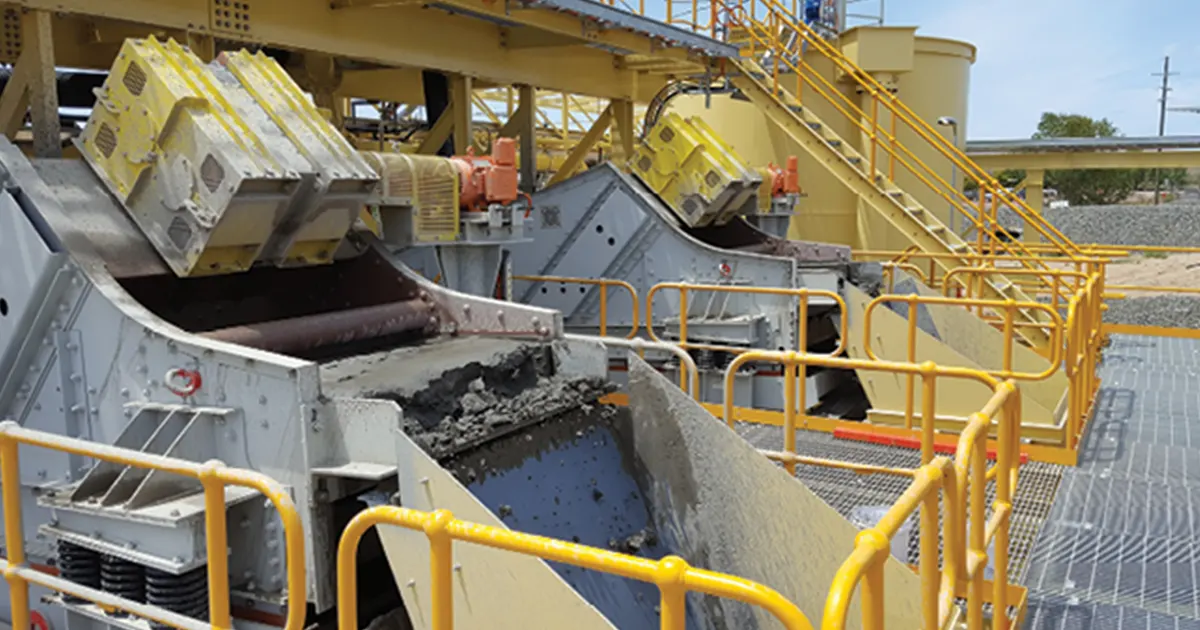
Vibrating screens can have problems that slow or stop your work. You need to spot these issues and fix them fast. Here are the most common failures in vibrating screens and what you can do.
Blinding and Clogging
Blinding and clogging happen when material blocks the screen holes. This causes build-up on the screen and makes screening less efficient.
Causes and Fixes
Blinding and clogging often happen when:
- The material is too wet. Wet material sticks and covers the screen.
- Particles are sticky or have static charge. They clump and block holes.
- Light or odd-shaped particles float or wedge into the mesh.
- There are too many particles close to the mesh size.
- The screen selection is wrong. Thick wires or the wrong mesh shape make it worse.
- The screen does not have cleaning devices. Vibration alone is not enough.
To fix these faults in vibrating screens, you can try:
| Method | Description |
|---|---|
| Bed Depth Adjustment | Change how thick the material layer is. This keeps small particles from blocking holes. |
| Spray Bars | Use water spray bars to wash away sticky fines. This works well with wet materials. |
| Vibration Settings | Adjust vibration speed or pattern. This shakes loose stuck particles. |
| Self-Cleaning Screens | Use screens that flex and move. They clear clogs automatically. |
| Polyurethane Panels | Install panels that resist blinding. They help material flow better. |
| Slot Apertures | Pick slot-shaped holes. This reduces pegging and lets more shapes pass through. |
| Size Adjustment | Change hole size to match your material. |
Tip: If throughput drops or material flow is uneven, check for blinding and clogging first.
Prevention Tips
You can prevent blinding and clogging by:
- Picking the right screen media for your material.
- Using self-cleaning screens or adding cleaning devices.
- Keeping feed material as dry as possible.
- Adjusting vibration settings to match your material type.
- Inspecting the screen often for early signs of build-up.
Screen Media Wear
Screen media wear is a common vibrating screen failure. Worn screens lower efficiency and cause more faults in vibrating screens if not replaced soon.
Identifying Wear
Look for these signs of wear:
- Holes or tears in the screen media.
- Thin or shiny spots on the screen surface.
- Loose or broken wires in woven wire cloth.
- Cracks or missing chunks from rubber or polyurethane panels.
- More material passing through than normal or poor separation.
Different screen media types wear at different rates:
- Woven wire cloth has high open area and good efficiency. It needs frequent changeouts.
- Polyurethane lasts longer, especially for wet or abrasive materials. It has less open area.
- Rubber media works well for heavy loads and lasts longer than wire. Throughput drops.
- Hybrid media mixes wire with rubber or urethane. It boosts production and wear life.
Note: Engineered screen media like polyurethane and rubber resist wear and breakage better than standard options.
Replacement Steps
When you see wear, follow these steps:
- Shut down the vibrating screen and lock out power.
- Remove the worn screen media carefully.
- Clean the screen deck and check for damage or cracks.
- Install new screen media. Make sure it fits tightly and is tensioned right.
- Check clamps and fasteners for wear or looseness.
- Restart the screen and check for proper operation.
Using fabricated components may save money at first. Small imperfections can cause frequent breakage and higher maintenance costs over time.
Vibration Imbalance
Vibration imbalance is another common failure in vibrating screens. It can cause unplanned shutdowns and damage if not fixed quickly.
Spring Adjustment
Springs support the vibrating screen and absorb shock. If springs wear out or lose stiffness, the screen vibrates unevenly. You should:
- Check springs for cracks, fatigue, or sagging.
- Replace damaged or weak springs right away.
- Make sure all springs have the same height and compression.
Routine checks help you find spring problems before they cause bigger faults in vibrating screens.
Counterweight Angle
The counterweight angle affects how the screen vibrates. If the angle is wrong, you get uneven movement and poor screening. To fix this:
- Check the counterweight angle. Adjust it to match the manufacturer’s settings.
- Balance the load across the screen to avoid uneven wear.
- Check the motor and drive system for worn parts.
Changes in vibration patterns often mean motor imbalance, loose parts, or worn bearings. Regular vibration monitoring helps you spot these problems early and avoid costly downtime.
Remember: Fixing vibration imbalance quickly keeps your vibrating screens running smoothly and lowers the risk of unplanned shutdowns.
Motor and Bearing Issues
You need vibrating screens to keep your work going. If you have motor and bearing problems, your machine can stop working. These problems can cost a lot of money. You might hear weird sounds or feel the screen shake in a strange way. Sometimes, the machine shuts down without warning. You should look for these signs early so you can fix them before they get worse.
Here are some common motor and bearing problems you might see:
| Issue | Description |
|---|---|
| Broken belts | A common failure in the transmission system. |
| Faulty bearings | Often leads to mechanical breakdowns. |
| Electrical unbalance | Causes operational inefficiencies. |
| Overheating | A frequent cause of motor failure. |
| Misalignment | Leads to excessive wear and tear. |
| Excessive force | Can cause mechanical breakdowns. |
| Inconsistent vibration | Indicates potential motor issues. |
| Strange noises | Often a sign of underlying mechanical problems. |
Overheating
Overheating is a big reason why motors and bearings break. You might notice the motor feels very hot. Sometimes, the bearings smell like something is burning. Overheating can happen if there is not enough oil or grease. It can also happen if air cannot move around the motor or if you put too much material on the screen. If you do not fix these problems, the motor or bearings can break forever.
To stop overheating, you should:
- Check and clean the fans and vents often.
- Use the right kind and amount of oil or grease for the bearings.
- Do not put too much material on the screen.
- Watch the temperature when the machine is running.
Tip: If you hear strange sounds or feel too much heat, turn off the machine and check the motor and bearings right away.
Locking and Breaking
Bearings or motor parts can lock up or break. This can make the vibrating screen stop working fast. You might hear grinding or knocking before it stops. These problems can happen if parts are not lined up right, if there is too much force, or if parts are old and worn out.
To help stop locking and breaking:
- Check if the motor and drive system are lined up right.
- Change any bearings that are worn or broken right away.
- Make sure all bolts and fasteners are tight.
- Check for shaking and noise on a regular schedule.
If you find these problems early, you can stop the machine from shutting down when you do not expect it. This helps your vibrating screens last longer.
Loose Components
Loose parts can cause big trouble for vibrating screens. If things like screen plates or ring clamps get loose, you lose the right tension. This makes the screen shake badly and the material does not move right. The screen media can wear out faster. You might also see more blinding or clogging.
Some problems from loose parts are:
- The screen is not tight, so it does not vibrate well.
- Material does not separate the way it should.
- The screen wears out faster and needs to be changed more often.
- There is a bigger chance of blinding and clogging.
Doing regular maintenance helps you stop these problems. Always check and tighten every part when you inspect the machine.
Screen Plate Fixing
Screen plates keep the screen media in place. If they get loose, the screen loses tension and cannot vibrate right. You should:
- Check screen plates to see if they are loose or broken.
- Tighten all bolts and fasteners to the right tightness.
- Change any parts that are worn or broken.
- Make sure the tension is even across the whole screen.
Note: If you take a screening rack out to fix it, your work can slow down and you lose time. Keep screen plates tight so you do not have to stop the machine.
Ring Clamp Tightening
Ring clamps hold the edges of the screen media. If ring clamps are loose, the screen can move or shake the wrong way. This can let material go past the screen or hurt the mesh.
To keep ring clamps tight:
- Check clamps every time you do maintenance.
- Tighten clamps the way the maker says.
- Change clamps if they are worn out or bent.
- Make sure the screen media sits flat and tight under the clamps.
When you keep all parts tight and in good shape, you protect your vibrating screens and help them separate material better.
Troubleshooting Guide
Inspection Checklist
You need a solid inspection routine to keep vibrating screens running well. Start each shift by checking the tension of the screen media. Look for wear on all screen parts, including the frames and media. Make sure the side sealing is in place so you do not lose material. Clean and check spray nozzles for blockages. Watch for blinding or pegging on the screen surface. Check the discharge to see if the material size is correct.
Here is a quick checklist to follow:
- Check screen tension at the start of each shift.
- Inspect for wear on media, frames, and side sealing.
- Clean and check spray nozzles.
- Look for blinding, pegging, or build-up.
- Check discharge for proper sizing.
- Inspect for debris and keep inlet and outlet clear.
- Start the screen with no load to observe how it runs.
- Feed material evenly to avoid build-up.
You should also check the lubrication system and listen for any strange sounds or vibrations. If you find anything unusual, fix it right away. Regular maintenance helps you avoid bigger problems with vibrating screens.
Listening for Warning Signs
Your ears can help you spot trouble early. Listen for odd noises when vibrating screens are running. Sounds like grinding, knocking, or rattling can mean something is wrong. You might hear changes in vibration or a new hum. These warning signs often show up before a big failure.
Many plants use advanced sensors to listen for problems. These sensors collect vibration data and set alerts if something changes. Real-time monitoring helps you catch issues before they stop your work. You can prevent breakdowns by acting fast when you hear warning signs.
Tip: If you hear a new sound, stop and check the machine. Early action saves time and money.
Testing Vibration
Testing vibration helps you find hidden problems in vibrating screens. You can use different methods to check vibration levels. Some plants use sensors for continuous monitoring. These sensors collect data all the time and alert you if something changes. You can also use a bump test. This means you tap the screen and measure how it moves. The run-up or coast-down test records vibration as the screen starts or stops. This helps you find resonance zones. Steady-state operation analysis checks the screen at full speed to spot loose parts or structural issues.
| Method | Description |
|---|---|
| Continuous Monitoring | Uses sensors for real-time data collection and analysis. |
| Bump Test | Involves tapping the screen to find natural frequencies with accelerometers. |
| Run-Up / Coast-Down Test | Records vibration during startup and shutdown to find resonance zones. |
| Steady-State Operation Analysis | Checks operating parameters at full speed to detect loose parts or structural problems. |
You should test vibration often. This helps you find problems before they cause downtime. Good vibration testing keeps your vibrating screens working longer.
Root Cause Isolation
You need to find the real reason behind problems in vibrating screens. If you only fix the symptoms, the same issues will come back. Root cause isolation helps you stop repeated failures and keep your equipment running longer.
Start by looking at the signs you see or hear. If you notice strange noises, uneven movement, or poor material flow, you should not guess. Use a step-by-step approach to find the source.
Follow these steps to isolate the root cause:
- Gather Clues: Write down what you see, hear, or feel. Note when the problem started and if it happens at certain times.
- Check the Obvious: Look for loose bolts, broken parts, or worn screen media. Many problems with vibrating screens start with simple issues.
- Test Springs: Springs support the screen and control vibration. Press down on each spring to check for even compression. If one spring feels softer or lower, replace it.
- Inspect Counterweights: The counterweight angle affects how vibrating screens move. Use a protractor or angle gauge to check the setting. Adjust it to match the manufacturer’s guide.
- Examine Bearings and Motor: Feel for heat near the bearings and motor. Listen for grinding or knocking. If you find these signs, you may need to replace the part.
- Review Vibration Data: If you use sensors, look at the vibration patterns. Sudden changes can point to a loose part or imbalance.
- Check Screen Tension: Loose screen media can cause poor separation and extra wear. Use a tension tool or tap the screen to check for tightness.
Tip: Always fix the root cause, not just the effect. If you only tighten a bolt but do not replace a weak spring, the problem will return.
You can use a simple table to track your findings:
| Symptom | Possible Cause | Action Taken |
|---|---|---|
| Uneven vibration | Weak spring | Replaced spring |
| Loud knocking | Loose counterweight | Tightened bolts |
| Poor separation | Loose screen media | Retensioned screen |
When you follow these steps, you solve problems faster. You also prevent bigger failures in vibrating screens. This saves you time and money. Always keep records of what you find and fix. Good records help you spot patterns and avoid future trouble.
Vibrating Screen Maintenance Practices
Regular Inspections
You should check vibrating screens often. Inspections help you find problems early. This stops downtime before it starts. You can see loose bolts, cracks, or worn parts sooner. This keeps your equipment safe and working well. Use a checklist so you do not miss anything.
Here is a simple table to help with inspections:
| Frequency | Inspection Tasks |
|---|---|
| Monthly | Look at drive V-belts and drive systems for wear, tension, and leaks. Tighten loose bolts and replace missing hardware. Check screen frame for cracks. |
| Annually | Overhaul the vibrator, clean, and change rolling bearings if needed. Think about getting a professional to check it. |
You should also:
- Check the screen mesh for damage or wear from material.
- Use special tools to look at the screen mesh closely.
- Plan weekly or monthly checks for all parts to spot wear early.
When you follow preventive maintenance steps, you lower the risk of sudden failures. You also make your vibrating screens last longer.
Tip: Always check springs, screen plates, and ring clamps when you inspect. These parts can loosen or wear out first.
Lubrication Schedule
Lubrication helps your vibrating screens run smoothly. Bearings and motors need the right grease or oil. If you skip lubrication, parts can get too hot or wear out fast. You should check the lubricant often. Look at how much there is, its color, and thickness.
Follow these steps for a good lubrication routine:
- Check the motor and bearing lubricant often.
- Add or change lubricant as the maker says.
- Pick the right brand and type for your machine.
- Lubricate bearings, drive parts, and moving parts as suggested.
- Use 2# lithium-based grease in winter and 3# lithium-based grease in summer.
- For vibrator exciters, add oil once a week (about 300-600mL).
- Use only the grease or oil the maker recommends.
- Do not use too much grease. Too much can attract dust or hurt other parts.
Note: Good lubrication stops overheating and lowers the chance of breakdowns.
Screen Media Replacement
Screen media wears out as time goes by. You need to change it before it fails. If you wait too long, you risk more downtime and bad screening results. Watch for signs of wear and tear like holes, tears, or thin spots.
Here is how you can handle screen media replacement:
- Check the screen media during every regular inspection.
- Look for damage, loose wires, or missing pieces.
- Turn off the machine and lock out power before changing any parts.
- Take out the old screen media carefully.
- Clean the screen deck and check for cracks or other damage.
- Put in new screen media. Make sure it fits tight and is tensioned right.
- Tighten all clamps and fasteners.
- Start the machine again and check if it works well.
You should keep extra screen panels ready. This helps you change them fast and avoid long delays. When you change screen media on time, you keep your vibrating screens working their best.
Reminder: Always write down each replacement in your maintenance log. This helps you track wear and plan future replacements.
Bearing and Motor Monitoring
You need to watch bearings and motors closely to keep vibrating screens running well. Bearings and motors work hard every day. If they fail, your vibrating screens can stop without warning. You can use modern sensors to help you find problems early. These sensors pick up small changes that you might not notice. You can act fast and fix issues before they get worse.
Here is how monitoring helps you:
| Key Aspect | Explanation |
|---|---|
| Early Detection | Modern sensors can identify early warning signs of bearing failure that may be missed by human senses. |
| Continuous Monitoring | Online systems provide real-time data, allowing for immediate action before failures occur. |
| Predictive Maintenance | A robust monitoring program helps catch issues before they escalate, reducing maintenance costs. |
You should check for heat, noise, and vibration in the bearings and motors. If you hear grinding or feel too much heat, stop the machine and inspect it. You can use handheld tools or install permanent sensors for constant checks. These steps help you avoid sudden stops and keep your vibrating screens working longer.
Tip: Set up a schedule to check bearings and motors. Write down what you find each time. This makes it easier to spot changes and fix problems early.
Maintenance Logs
You need to keep good records to make your vibrating screens last longer. Maintenance logs help you track every inspection, repair, and part change. When you write down what you do, you can see patterns and plan better.
- You can track all inspections, repairs, and part changes in one place.
- You can review the log to find patterns in equipment failures.
- You can use the log to plan proactive maintenance and avoid repeated problems.
A maintenance log helps you remember when you last checked the springs, screen plates, or ring clamps. You can see if the same part fails often. This helps you fix the real problem, not just the symptom. When you keep good records, you make better choices for your vibrating screens.
Note: Always update your maintenance log after every check or repair. This habit saves time and money in the long run.
Screen Media Selection
Woven Wire
Woven wire is a common choice for vibrating screens. You can put it in and change the mesh size easily. It works with many types of materials. Woven wire helps protect gentle products during screening. It does not damage them. This screen media does not cost much, so you save money when you need new ones.
But woven wire has some problems. It can get blocked or clogged more often. This means you have to clean or change it more. Sometimes, it lets less material through, especially with certain materials. This can slow down your work and use more energy.
Here is a quick look at the good and bad sides:
| Advantages | Disadvantages |
|---|---|
| Cheap and useful for many jobs, and you can change the mesh size easily. | Gets blocked easily, which means you need to clean or fix it more. |
| Good for gentle materials and keeps products safe. | Lets less material through with some materials, so you need more time and energy. |
You should look at woven wire screens often. Change them if you see holes, tears, or shiny spots. This helps your vibrating screens work well.
Polyurethane & Rubber
Polyurethane and rubber are strong choices for vibrating screens. Polyurethane does not wear out fast and keeps its shape. Rubber takes in heavy hits and makes less noise in your plant. Both last longer than woven wire, especially with tough or wet materials.
You need to check these screens often. Polyurethane needs checks for wear, but it usually lasts longer. Rubber is best for heavy loads or if you want less noise. How often you do maintenance depends on your material and how much you use the screen.
Here is a comparison:
| Material | Wear Resistance | Maintenance Intervals |
|---|---|---|
| Polyurethane | Does not wear out fast | Needs regular checks |
| Rubber | Takes in heavy hits | Maintenance depends on many things |
- Polyurethane does not wear out fast and keeps its shape.
- Rubber takes in hits and makes less noise.
- Both need regular checks to find problems early.
You can use these materials to help your vibrating screens last longer and stop downtime.
Self-Cleaning
Self-cleaning screen media helps your vibrating screens run without stopping a lot. These screens move and bend to clear out clogs and stop blocking. You get better results, especially with sticky or muddy materials. Self-cleaning screens keep your work smooth and cut down on maintenance time.
- Self-cleaning screens stop clogs and keep your machine working.
- They are good for sticky or wet materials.
- You spend less time fixing things and avoid sudden stops.
- The design stops blocking, so you get better screening.
You should think about self-cleaning screens if you want your vibrating screens to work well and not stop often.
Perforated Plate
You can pick perforated plate screen media when you need something strong for vibrating screens. Perforated plates are good for jobs with big, rough materials. They do not bend or break easily, even with heavy loads. The surface is stiff and can handle rocks or large pieces.
Perforated plates have holes punched in metal sheets. These holes let material go through but keep the plate strong. You can pick different hole shapes and sizes for your job. Perforated plates last longer than woven wire in tough places. You do not have to change them as often because they do not wear out fast.
You should look at perforated plates for cracks or worn spots during regular checks. If you see damage, put in a new plate to keep your vibrating screens working well. Perforated plates do not need to be replaced as much as wire screens, but you still need to check them often.
Here is a table that shows how perforated plates and other screen media work with heavy loads:
| Type of Screen Media | Performance Under High-Impact Conditions |
|---|---|
| Perforated Plates | Rigid and durable, ideal for coarse screening and heavy-duty loads |
| Rubber Panels | Strong impact absorption, lower noise; ideal for heavy impact zones |
You can use perforated plates in vibrating screens when you want something strong. They help you stop downtime and keep your screening process working well.
Matching Media to Conditions
You need to pick the right screen media for where your vibrating screens work. Different weather and materials can change how screen media works. If you choose the wrong media, you might have more downtime and faster wear.
Hot, dry weather can make some screen media break easily. Polyurethane can flake and break if it gets too hot for a long time. Cold weather can make wire and polyurethane stiff. This makes them crack more easily. Rain and wet air can make rust and corrosion happen faster. You need screen media that does not rust to keep your machine running.
You should think about the weather and material before you pick screen media. Here is a table to help you match media to different weather:
| Climate Condition | Recommended Screen Media Features | Considerations |
|---|---|---|
| Hot, dry conditions | – Optimal UV protection – Heat resistance | Polyurethane can become brittle and flake under high heat, reducing lifespan and increasing downtime. |
| Cold temperatures | – High-grade wire – Specialized polyurethane | Low temperatures can make materials rigid and brittle, increasing the risk of cracking. |
| Rain & humidity | – Independently vibrating wires – Corrosion-resistant screen media | Excess moisture accelerates rust formation and can lead to operational disruptions. |
You can make vibrating screens work better by picking the right media for your weather. You should also think about the material you screen. Sticky or rough materials need tough media. Wet materials need self-cleaning or media that does not rust.
You can ask your screen media supplier for help. They can help you pick the best media for your vibrating screens. When you match media to your weather and material, you get longer life and less downtime.
Advanced Solutions for Downtime Reduction
Condition Monitoring
You can use condition monitoring to help your vibrating screens last longer. This technology uses smart sensors to watch vibration, temperature, and pressure. These sensors give you live data about your equipment. If the numbers change, you know there might be a problem.
- Sensors check important signs of how your machine is doing.
- They warn you if something changes, like more shaking or heat.
- You can fix small problems before your machine stops.
Condition monitoring lets you plan repairs before things break. You save money because you do not need emergency repairs. You also have less downtime because you find problems early. By watching your vibrating screens, you make them work better and last longer.
Tip: Use condition monitoring to get warnings about your vibrating screens. Early warnings help you fix things fast and stop big problems.
Upgraded Screen Media
You can cut downtime by picking upgraded screen media for your vibrating screens. New materials like high-quality polyurethane, rubber, or self-cleaning screens last longer than old ones. These upgrades handle tough jobs and do not wear out fast.
- Upgraded screen media needs to be changed less often.
- You get better screening and fewer clogs.
- Your vibrating screens run more smoothly.
When you choose the right screen media for your material and weather, you stop many common problems. You spend less time fixing screens and more time working. Ask your supplier which screen media is best for your plant.
Predictive Maintenance Tools
Predictive maintenance tools use smart technology to watch your vibrating screens all the time. These tools learn how your machines usually act. If something changes, like a new shaking pattern, the system sends you a warning.
You do not have to guess when to fix your equipment. Predictive tools help you find problems before they stop your machine. You can plan repairs when it works best for you. This way, your vibrating screens last longer and use less energy.
By watching your vibrating screens with predictive tools, you avoid surprise breakdowns. You keep your plant running and spend less on repairs.
Note: Predictive maintenance tools help you check your machines and find problems early. This keeps your vibrating screens working their best.
Team Training & Communication
Operator Training
You need skilled operators to keep vibrating screens working well. Training helps your team find problems early and fix them fast. Operators should learn how to start and stop vibrating screens safely. Show them how to look for loose bolts, worn screen media, and odd noises. Operators must know how to read vibration data and use simple tools. You can use hands-on practice and easy guides to help them learn.
- Teach operators to check vibrating screens before each shift.
- Show them how to report problems right away.
- Give them checklists for daily jobs.
Tip: Operators who know their machines can stop downtime and keep work steady.
Maintenance Coordination
You need good teamwork to keep vibrating screens in great shape. Maintenance coordination means everyone knows their job and works together. You should set clear times for checks, oiling, and repairs. Use a calendar to plan maintenance days. Make sure operators and maintenance staff talk often.
- Assign jobs for checking springs, screen plates, and ring clamps.
- Share updates about repairs and new parts.
- Hold short meetings to look at maintenance logs.
A table can help you organize jobs:
| Task | Person Responsible | Frequency |
|---|---|---|
| Inspect screen media | Operator | Daily |
| Lubricate bearings | Maintenance Staff | Weekly |
| Tighten clamps | Operator | Weekly |
| Review logs | Supervisor | Monthly |
You keep vibrating screens working longer when your team follows a clear plan.
Reporting & Feedback
You need good communication to make vibrating screens work better. Reporting helps you track problems and find answers. Operators should write down problems in a log. Maintenance staff must update records after each repair. Supervisors should check logs and give feedback.
- Use easy forms for reporting problems.
- Ask your team to share ideas for better maintenance.
- Review feedback to spot patterns and stop future failures.
Note: Feedback helps you find weak spots in your process. You can fix them before they cause downtime.
You build a strong team when everyone shares information. You keep vibrating screens running well and cut downtime. Good training, clear teamwork, and open feedback make your plant safer and more productive.
Conclusion
Good maintenance is one of the best ways to keep vibrating screens running longer and more efficiently. When you fix small problems early and choose the right screen media, you can reduce downtime, improve performance, and avoid unnecessary wear. As a screen media manufacturer, we supply different types of screening media for a wide range of vibrating screen applications. The right combination of maintenance and screen media selection can make a real difference in screen life and plant performance.
FAQ
How often should you inspect vibrating screens?
You should inspect vibrating screens at least once a week. Look for loose bolts, worn screen media, and signs of vibration imbalance. Monthly and annual checks help you catch bigger issues early.
What causes screen media to wear out quickly?
Heavy loads, abrasive materials, and improper tension make screen media wear out fast. You can slow wear by choosing the right media and keeping it tight.
How do you prevent blinding and clogging?
Pick self-cleaning screen media. Keep feed material dry. Adjust vibration settings to match your material. Inspect screens often for early signs of build-up.
Why does the motor overheat?
Motor overheating happens when you use the wrong lubricant, block air vents, or overload the screen. Clean vents, use the right grease, and avoid overloading to keep motors cool.
What is the best screen media for wet materials?
Polyurethane and self-cleaning screens work best with wet materials. They resist clogging and last longer. Ask your supplier for advice based on your material.
How can you tell if springs need replacement?
Press down on each spring. If one feels softer or sits lower, replace it. Look for cracks or sagging. Springs should match in height and stiffness.
What records should you keep for maintenance?
Keep a log of inspections, repairs, and part changes. Write down dates, problems found, and actions taken. Review logs to spot patterns and plan future maintenance.
Can you use different screen media types together?
Yes, you can mix screen media types. Use rubber in high-impact zones and woven wire for fine screening. Mixing helps you match media to your material and conditions.