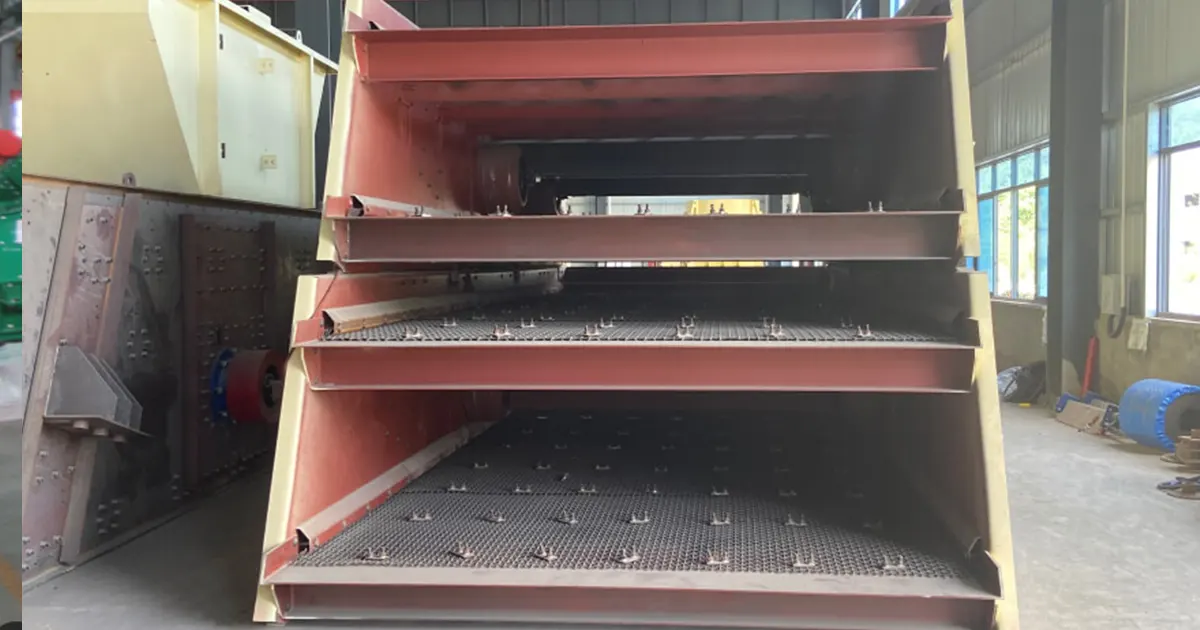
You want your screening to work well, right? Linear vibrating screens let you pick how to size, grade, and separate big materials. Your design choices are very important. If you choose the right screen size, deck setup, vibration level, motor type, feed spread, frame strength, surface, and easy maintenance, you make things work better, faster, and longer. Look at how these choices compare:
| Design Choice | Efficiency | Capacity | Durability | Maintenance Costs |
|---|---|---|---|---|
| Screen Area | High | High | Needs strength | Lower over time |
| Material Selection | Better | Changes | Stronger | Fewer repairs |
| Structural Integrity | Stops damage | Holds more | Lasts longer | Saves money |
| Maintenance Practices | Gets better | Stays steady | Longer life | Less spending |
Linear Vibrating Screen Design helps you get the best results and avoid problems.
Key Takeaways
- Pick the right screen size to sort better and faster. A longer screen is good for small pieces. A wider screen can handle more material at once.
- Choose the deck setup that fits your sorting job. One deck works for one size. Two or three decks can sort different sizes at the same time.
- Change vibration settings to fit your material. Use higher amplitude for sticky stuff. Use higher frequency for tiny pieces.
- Make sure the material spreads out evenly on the screen. This stops clogs and helps the screen work better.
- Get a strong frame to hold your screen. A tough frame lasts longer and needs less fixing. This saves money and time.
- Use the right screen surface for your material. Wire mesh is best for small, dry pieces. Polyurethane panels are better for wet or rough materials.
- Make sure you can reach parts for cleaning and fixing. Easy access means you can clean and replace parts fast. This keeps the screen working well.
- Change your screen design to match your material. Making the screen fit your needs helps it work better and faster.
Linear Vibrating Screen Design Overview
What Is a Linear Vibrating Screen
Basic Definition
A linear vibrating screen is a machine that sorts and separates materials. It moves materials in a straight line across the screen. The machine uses two motors to shake the screen back and forth. This shaking makes the material jump and move forward. It works like a conveyor belt, but it also sorts things by size.
Let’s look at how linear vibrating screens are different from circular vibrating screens:
| Feature | Linear Vibrating Screen | Circular Vibrating Screen |
|---|---|---|
| Vibration Motion | Moves in a straight line with two motors | Moves in circles or ovals with one shaft |
| Material Flow | Goes straight, good for sorting | Goes outwards, good for rough sorting |
| Best Applications | Used for grading, drying, and cleaning sand or plastics | Used for sticky or wet materials like mining |
| Screen Efficiency | More accurate, keeps material longer | Handles lots of material, less clogging |
These screens have a simple design with fewer moving parts. You spend less time fixing them and more time working.
Common Uses
Linear vibrating screens are used in many industries. Here are some examples:
| Industry Type | Application Description |
|---|---|
| Mining | Sorting and grading minerals |
| Coal | Cleaning coal |
| Construction Materials | Sorting and filtering rocks and sand |
| Plastics | Sorting plastic pieces |
| Abrasives | Cleaning abrasive materials |
| Metallurgy | Sorting metal ores and alloys |
| Chemical | Filtering and separating chemicals |
| Light | Sorting light materials |
| Food | Grading and cleaning food powders |
| Medical | Filtering in medical jobs |
| Pharmaceutical | Sorting medicine powders |
You might use a linear vibrating screen to sort sand, clean coal, or grade food powders. The straight-line motion helps you get better results for these jobs.
Custom Sizing and Decks
Screen Width Range
You can pick the width and length of your screen. Manufacturers check your material type, how much you want to process, and your goals. They use this information to build a screen that fits your needs. If you handle lots of material, you may need a wider screen. If you work with fine powders, a longer screen helps you separate better.
Single vs Double Decks
You can choose how many decks you want. A single deck is good if you only need one size. If you want to sort into two or more sizes, use a double deck. Each deck has its own screen surface. You can sort materials in one step. This saves time and space.
Tip: Custom sizing helps you handle almost any material, from heavy rocks to light powders. You get a screen that fits your process, not a one-size-fits-all screen.
Main Components
Screen Decks
Screen decks are where sorting happens. They are the main surfaces for your material. You can pick different deck types for your needs. Some screens use wire mesh. Others use perforated plates. The deck holds the screen media. It lets you separate materials by size. If you want to sort more sizes, you can add extra decks.
Deck Types
There are several deck types you can choose. Each one is best for certain jobs. Here is a comparison:
| Screen Type | Motion Pattern | Key Features |
|---|---|---|
| Linear Screens | Straight-line motion | Consistent throughput for general sorting applications |
| Circular Designs | Intensive agitation | Handles challenging materials |
| Specialized Screens | Various setups | Meets unique processing needs |
Linear screens give steady sorting. They work well for most materials. Circular designs shake things up more. They help with sticky or tough materials. Specialized screens let you handle special jobs.
Vibrating Motors & Drives
Motors and drives make the screen move. Linear vibrating screens usually have twin out-of-balance motors. These motors sit on each side of the screen box. They spin and create strong, straight-line vibration. This motion pushes your material across the screen. It helps separate the material.
Twin Out-of-Balance Units
Twin out-of-balance motors have many advantages:
- High efficiency: The straight-line motion moves materials quickly. It keeps the screen from clogging.
- Precise screening: You can use different mesh sizes. This sorts materials into exact sizes.
- Low energy use: The double-exciter drive system saves power. It lowers your costs.
- Easy maintenance: The simple setup lets you change screens fast. You can fix parts quickly.
- Dust-free operation: The enclosed design keeps dust inside. It keeps your workspace clean.
You get a reliable machine. It works hard and is easy to care for.
Frame Engineering
The frame holds everything together. You need a strong frame to support the screen decks and motors. It must handle all the shaking. Manufacturers use heavy-duty steel like Q235 carbon or 304 stainless. This builds frames that last. They reinforce the joints. The frame can handle constant vibration.
Structural Support
A good frame gives you:
- Durability: Strong steel and tight joints keep your screen running for years.
- Vibration resistance: Special bearings and springs absorb shocks. They reduce wear.
- Corrosion protection: Powder-coated finishes or stainless steel stop rust and damage.
- Smooth operation: Balanced exciters keep the screen steady. They lower stress on parts.
You can trust your screen to handle tough jobs. It keeps working day after day.
Tip: If you want your linear vibrating screen to last, pay attention to the frame. A solid frame means less downtime and fewer repairs.
Feed Distribution
You want your linear vibrating screen to work at its best. Feed distribution plays a big role in that. If you get this step right, you boost your screening efficiency and get better results. Let’s break down what matters most:
- Always spread material evenly across the screen. If you dump everything in one spot, you waste screening area. Some parts of the screen do all the work, while other parts sit empty.
- Use a feed box or impact area. This helps scatter the material as soon as it hits the screen. You get a nice, even layer that covers the whole surface.
- Watch your feed rate. If you see material bouncing off or flying up, you’re probably feeding too much. That means you lose product and waste energy.
- Check the size of your particles. If you notice that big and small pieces mix together on the screen, your feed flow might need adjusting.
- Look for signs of poor distribution. If you see piles or streaks, you need to fix your setup. A good feed should look smooth and even from side to side.
Tip: Stand by your screen and watch the material flow. You can spot problems fast. If you see uneven layers or material building up, adjust your feed box or slow down the feed rate.
When you get feed distribution right, you use the whole screen area. That means more material gets sorted in less time. You also cut down on wear and tear because the load spreads out evenly. You spend less time fixing clogs or replacing worn parts.
A well-fed screen works smarter, not harder. You get cleaner results, higher capacity, and a longer-lasting machine.
Working Principle
Linear Motion
You might wonder how a linear vibrating screen actually works. The secret lies in its straight-line movement. Two motors sit on each side of the screen. They spin in opposite directions. This action creates a strong force that pushes material forward in a straight path. You see the material jump and move across the screen, not in circles or random patterns.
This straight-line motion does more than just move things. It helps you separate materials by size. Smaller pieces fall through the screen openings. Larger pieces stay on top and move to the end. This method works best when you deal with fine materials that are not sticky or wet. You get clean, accurate sorting every time.
Tip: If you want to sort dry sand, plastic pellets, or fine powders, linear motion gives you the best results.
Vibration Amplitude & Frequency
You control how the screen shakes by adjusting amplitude and frequency. Amplitude means how far the screen moves up and down. Frequency means how many times it moves each second. These two settings change how your material behaves on the screen.
Let’s look at how frequency affects your results:
| Frequency (Hz) | Effect on Screening Efficiency |
|---|---|
| 24 | Best for small and medium-sized particles |
| 28 | Less efficient—material moves too fast |
- Higher frequencies work well for fine particles.
- Lower frequencies suit coarse materials.
- You can boost capacity by increasing amplitude.
When you set the right amplitude, you help more material move across the screen. If you pick the right frequency, you get better separation. Too much frequency can make material bounce too quickly. It spends less time on the screen, so you lose accuracy.
Note: Try different settings with your material. Watch how it moves. Small changes can make a big difference in how much you sort and how clean your product looks.
Material Flow
Material flow is all about how your product travels across the screen. You want a steady, even layer. If you pile too much on, the screen can’t do its job. If you feed too little, you waste space and energy.
Several things affect material flow:
- The amount of material on the screen changes how well you separate sizes.
- The angle of the screen helps control speed. A steeper angle moves material faster.
- When you increase amplitude or frequency, material flows quicker.
You can stand by your screen and watch the flow. If you see material moving too fast, slow things down. If it moves too slow, try a steeper angle or higher amplitude. The goal is to keep material moving smoothly from start to finish.
Tip: Good material flow means better sorting, less wear, and higher capacity. Adjust your setup until you see a nice, even layer moving across the whole screen.
Key Factors in Linear Vibrating Screen Design
If you want your screening to work well, you must focus on some important things. Let’s look at what matters most in linear vibrating screen design and how each choice changes your results.
Screen Size
Picking the right screen size is a big step. The length and width of your screen decide how much material you can handle and how well you sort sizes.
Length & Width
Screen length is like the time your material stays on the screen. A longer screen lets particles find the right hole and drop through. This gives you better sorting, especially for materials that are almost the same size as the holes.
Screen width is about how much you can process at once. A wider screen lets you handle more material quickly. If you need to sort fine particles, a longer screen helps you get cleaner results.
- The right screen size helps you sort particles well and keeps your output high.
- Fine materials, like coal dust, need small holes and high frequency. Bigger materials, like gravel, work better with larger holes.
- The shape and size of the holes also change how fast material moves and how well you sort sizes.
When particles are almost the same size as the holes, they have trouble passing through. This can make your screen less efficient, especially if you have lots of “near-mesh” particles blocking the holes.
Deck Arrangement
Deck arrangement means how many layers your screen has and how you set them up. You can pick a single deck if you only need one size. If you want to sort into two or more sizes, use double or triple decks.
- Single deck: Good for simple jobs with one size.
- Double deck: Lets you sort into two sizes at once.
- Multiple decks: Great for jobs with several size needs.
Each deck has its own screen surface. Material moves from the top deck to lower decks, getting sorted at each step. The right deck setup saves you time and space. You get more done with less equipment.
Tip: To boost your efficiency, match your deck setup to your material and your goals.
Vibration Parameters
Vibration is the main part of linear vibrating screen design. How your screen shakes—how far it moves (amplitude) and how fast it moves (frequency)—changes how your material flows and sorts.
Amplitude
Amplitude is how far the screen moves up and down each shake. A bigger amplitude means the screen moves more. This helps heavy or sticky materials move across the screen and keeps holes from clogging.
- High amplitude: Good for tough, wet, or sticky materials. It breaks up clumps and keeps things moving.
- Low amplitude: Works best for dry, easy materials. It gives you more exact sorting.
Frequency
Frequency is how many times the screen moves each second. You measure it in hertz (Hz). The right frequency depends on your material.
- High frequency: Best for fine particles. It helps small pieces find holes and drop through.
- Low frequency: Better for big materials. It keeps large pieces moving without bouncing too much.
The vibration settings, like amplitude, frequency, and angle, change how well your screen works.
Here’s a quick look at how vibration settings affect your screen:
| Factor | Description |
|---|---|
| Vibration G-force | Using a G-force between 3G to 7G changes stress, wear, and energy use. |
| Speed and Stroke | Picking the right speed and stroke for your job changes how material moves and how well you sort. |
When you set up your linear vibrating screen, think about your material’s size, moisture, and density. Wet or sticky materials may need higher amplitude or a different frequency to keep the screen from clogging.
- Efficiency: The amount of material on the screen changes how well you sort sizes.
- Material properties: Things like speed and angle of repose (how material piles up) change your output.
- Angle of repose: This affects how material spreads across the screen.
When you pick vibration settings, always think about your material’s properties. If you see clogging or bad sorting, try changing amplitude or frequency. Small changes can help a lot.
Inclination Angle
You might not think about the angle of your screen, but it changes everything. The inclination angle decides how fast material moves across the screen. If you set the screen flat, material stays longer. This gives particles more time to find the right hole and drop through. If you tilt the screen, material moves faster. You sort more, but you might lose accuracy.
Most linear vibrating screens use a slight incline, usually between 0° and 15°. You can adjust this angle to match your material. Heavy or sticky materials need a steeper angle. Dry, free-flowing materials work well with a gentle slope.
Here’s a quick guide:
| Inclination Angle | Material Speed | Sorting Accuracy | Best For |
|---|---|---|---|
| 0°–5° | Slow | High | Fine powders, dry sand |
| 6°–10° | Medium | Good | Plastics, light minerals |
| 11°–15° | Fast | Lower | Wet, sticky, heavy ore |
Tip: Try changing the angle if you see material moving too slow or too fast. You can boost efficiency with a small adjustment.
Motor Setup
You want your screen to shake just right. The motor setup controls how much energy you use and how steady your vibration stays. If you pick the right motors and drives, you save money and get better results.
Let’s break down what matters:
- The force needed for the right amplitude and frequency changes your energy use. If you use too much force, you waste power. If you use too little, your screen won’t sort well.
- The mass of your screen and the drive type affect how much energy you need. Heavy screens need stronger motors.
- Advanced drives, like variable frequency drives, help you use less energy. They keep your screen running steady and smooth.
You also need to install your motors the right way:
- Place your screen on a solid, level foundation. This absorbs vibration and keeps your building safe.
- Align the motor and exciter shafts carefully. If you don’t, your screen shakes unevenly and wears out fast.
- Use high-quality damping springs. Keep tension equal on all sides. This stops the screen from wobbling and keeps vibration steady.
Note: A good motor setup means you spend less on energy and repairs. Your screen works longer and stays reliable.
Feed Rate
Feed rate is how much material you put on the screen at once. If you get this step right, you boost your screening efficiency. If you feed too little, your screen sits idle. You waste energy and time. If you feed too much, you overwhelm the screen. Material piles up, and you lose sorting accuracy.
You need to find the sweet spot. The best feed rate lets your screen media work at full power. Material spreads out in a thin, even layer. Particles move across the screen and drop through the right holes.
Here’s what happens with different feed rates:
| Feed Rate | Screening Efficiency | Common Problems |
|---|---|---|
| Too Low | Poor | Idle runs, wasted energy |
| Optimal | High | Clean sorting, best output |
| Too High | Poor | Clogging, bad separation |
Tip: Watch your screen as you feed material. If you see piles or streaks, adjust your feed rate. You can improve results with small changes.
Linear Vibrating Screen Design helps you balance all these factors. When you set the right angle, motor setup, and feed rate, you get a screen that works smarter and lasts longer.
Frame Strength
You want your screen to last, right? Frame strength is the backbone of your machine. If you pick a strong frame, your linear vibrating screen can handle heavy loads and keep working for years. Let’s break down why frame strength matters:
- The frame supports all the shaking and movement during operation. It keeps everything steady.
- Manufacturers use high-tensile steel because it’s tough and light. This steel resists fatigue and stands up to constant vibration.
- Reinforced frames, like those with cross-bracing, stop the screen from bending or twisting. You get a machine that stays in shape even under extreme workloads.
- Industrial screens are built for continuous, heavy-duty jobs. Strong frames and wear-resistant decks mean fewer breakdowns and lower maintenance costs.
If you want reliability, focus on frame strength. You get a screen that works hard and doesn’t quit. That’s a smart move for any Linear Vibrating Screen Design.
Tip: Check for signs of wear or cracks in the frame. If you spot problems early, you can fix them before they get worse.
Surface Selection
Choosing the right screen surface is a big deal. You need to match the surface to your material and your goals. If you pick the wrong surface, you lose efficiency and waste time. Here’s how you can make the best choice:
| Criteria | Description |
|---|---|
| Define Screening Requirements | Think about what you want to achieve and what your material is like. Look at particle size and moisture. |
| Evaluate Key Performance Indicators | Focus on accuracy and capacity. These help you keep production steady and make sure your material is sorted right. |
| Consider On-Site Adaptability | Look at your work environment. Make sure your screen can handle dust, static, and is easy to maintain. |
| Integrate Typical Application Scenarios | Pick surfaces that fit your job. If you work with light materials or special processes, choose a surface that boosts efficiency and keeps things stable. |
You have options like wire mesh, polyurethane panels, self-cleaning screens, and perforated plates. Each one works best for certain materials and conditions. If you want to get the most out of your Linear Vibrating Screen Design, match your surface to your needs.
Note: If you’re not sure which surface to pick, ask your supplier for advice. They can help you find the best fit for your job.
Maintenance Access
You want your screen to be easy to fix and clean. Good maintenance access saves you time and money. If you can reach all parts of your screen, you can change surfaces, check motors, and clean decks without hassle.
- Look for screens with quick-release panels or easy-to-open doors. These features let you swap out parts fast.
- Make sure there’s enough space around the machine. You need room to work safely.
- Choose designs with clear access to motors and drives. If you can reach these parts, you can keep your screen running smooth.
If you plan for maintenance access from the start, you avoid long shutdowns and keep your screen working longer. That’s smart planning for any screening operation.
Tip: Keep a regular maintenance schedule. If you check your screen often, you catch problems early and avoid big repairs.
Design Impact on Performance
Material Speed
You want your materials to move across the screen at the right speed. If the screen angle is too steep, particles rush across and don’t get enough time to drop through the holes. If the screen is too flat, materials crawl slowly and pile up. This can cause blinding, where the screen gets blocked and stops working well.
Here’s a quick look at how screen angle changes material speed and retention time:
| Screen Angle | Effect on Material Speed and Retention Time |
|---|---|
| Too Steep | Material moves too fast, insufficient time for particles to pass through. |
| Too Flat | Material moves too slowly, potentially leading to a thick bed and blinding. |
The angle also changes how big the holes look to the particles. When you set the screen more horizontal, the openings seem larger. This helps smaller particles find their way through. The angle affects how fast materials move and how long they stay on the screen.
Tip: Watch your screen in action. If you see materials flying off too quickly or piling up, try adjusting the angle. Small changes can make a big difference.
Retention Time
Retention time is how long your material stays on the screen. You want enough time for particles to find the right holes and drop through. If materials move too fast, you lose sorting accuracy. If they move too slow, you risk clogging and lower capacity.
- The screen angle controls retention time. A steeper angle means less time for sorting. A flatter angle gives particles more time but can cause buildup.
- The thickness of the material layer, called bed depth, also matters. If the bed is too thick, particles on top may never reach the screen surface.
- You can change retention time by adjusting feed rate, vibration settings, and screen angle.
Note: Try different settings to find the best balance. You want materials to move smoothly and get sorted without clogging.
Throughput
Throughput is how much material your screen can handle in a given time. You want high throughput, but you also want good sorting. The way you design your screen changes how quickly particles pass through.
- Material flow dynamics decide how fast particles move and how many get sorted.
- Bed depth affects throughput. A thinner bed lets more particles reach the screen, but it can cause spikes in the load.
- Feed distribution is key. If you spread material evenly, you use the whole screen and boost throughput.
- The design of the screen itself, including the surface and vibration settings, helps optimize efficiency.
- Particle size, shape, moisture, and density all play a role in how well your screen works.
- Screening aids, like fluidizing pads or ultrasonic transducers, keep holes clear and improve throughput.
Tip: If you want to get the most out of your Linear Vibrating Screen Design, focus on feed distribution and screen angle. These factors help you reach high throughput without losing sorting quality.
You can see that every design choice affects how fast materials move, how long they stay, and how much you can process. When you pay attention to these details, your screen works better and lasts longer.
Efficiency
You want your screening process to run smoothly and get the most out of your equipment. Efficiency is all about how well your linear vibrating screen sorts materials and keeps production moving. When you set up your screen the right way, you save time and energy. You also get cleaner results.
Let’s look at what affects efficiency:
- Screen surface choice: If you pick the right surface, you stop clogging and let more material pass through.
- Vibration settings: Adjusting amplitude and frequency helps you match the screen to your material. You get better separation and less waste.
- Feed distribution: Spreading material evenly across the screen means every part works hard. You avoid dead spots and boost output.
- Maintenance access: Easy-to-reach parts let you fix problems fast. You spend less time on repairs and more time screening.
Tip: Watch your screen in action. If you see piles or streaks, try changing the feed rate or vibration settings. Small tweaks can make a big difference.
Here’s a quick table to show how different factors impact efficiency:
| Factor | Impact on Efficiency |
|---|---|
| Screen Surface | Stops clogging, boosts flow |
| Vibration Settings | Improves sorting |
| Feed Distribution | Uses full screen area |
| Maintenance Access | Reduces downtime |
You can improve efficiency by checking your setup often. If you notice slow sorting or blocked holes, make adjustments right away. Your screen will work better and last longer.
Fine Separation
You want to sort materials into exact sizes. Fine separation is the key to getting clean, high-quality products. If your screen can separate small particles well, you get more value from your process.
Here’s what helps with fine separation:
- High-frequency vibration: This shakes small particles loose and helps them drop through the holes.
- Thin material layer: If you keep the bed depth low, more particles reach the screen surface. You get better sorting.
- Proper screen surface: Wire mesh or self-cleaning screens work best for fine materials. They stop blinding and keep holes clear.
Note: Try using a longer screen for fine separation. This gives particles more time to find the right hole.
You can test different settings to see what works best. If you see too many fines in your oversize pile, try increasing frequency or changing the screen surface. You’ll get cleaner results and less waste.
Service Life
You want your linear vibrating screen to last as long as possible. Service life depends on how you design and care for your equipment. If you pick strong materials and keep up with maintenance, your screen will handle tough jobs for years.
Here’s how you can extend service life:
- Strong frame: High-tensile steel and reinforced joints stop cracks and bending.
- Wear-resistant surfaces: Polyurethane panels and self-cleaning screens resist abrasion and last longer.
- Regular maintenance: Checking for wear, cleaning surfaces, and tightening bolts keeps your screen in top shape.
Tip: Set a maintenance schedule and stick to it. You’ll catch problems early and avoid big repairs.
When you focus on service life, you save money and keep production steady. Linear Vibrating Screen Design helps you build a machine that works hard and stays reliable.
Application Considerations
Fine vs Coarse Material
You need to pick the right screen for your material size. Fine materials, like sand or powder, act differently than coarse materials, like gravel or rocks. If you work with fine particles, use a screen with small holes and high-frequency vibration. This helps tiny pieces go through the holes. You also need a longer screen so particles have more time to drop.
Coarse materials need bigger holes and lower frequency. Large particles move faster and need more space to spread out. A wider screen helps handle heavy loads. If you use a fine mesh for coarse material, the holes will clog and slow your process.
Here’s a quick comparison:
| Material Type | Screen Opening | Vibration Frequency | Screen Length | Best Deck Type |
|---|---|---|---|---|
| Fine | Small | High | Long | Wire mesh/self-clean |
| Coarse | Large | Low | Medium | Perforated plate |
Tip: Always check your material size before picking a screen. You will save time and get better results.
Dry vs Wet Screening
You might wonder if moisture changes how you screen material. Dry materials, like sand or plastic pellets, move easily across the screen. You can use almost any surface, but wire mesh works best for clean sorting. Dry screening needs less vibration and lower amplitude.
Wet materials, like slurry or damp minerals, stick together and clog the screen. You need higher amplitude to shake loose the clumps. Polyurethane panels or self-cleaning screens help stop blinding. Wet screening often uses steeper angles to move material faster.
Here’s what you should remember:
- Dry screening: Use wire mesh, lower amplitude, gentle slope.
- Wet screening: Use polyurethane or self-cleaning, higher amplitude, steeper angle.
Note: If you see material sticking or clogging, switch to a self-cleaning surface or increase vibration.
Sticky vs Free-Flowing
Sticky materials make screening harder. If you handle clay, wet sand, or sticky minerals, you will see clumps and buildup. You need a screen with high amplitude and a self-cleaning surface. This keeps holes clear and stops material from piling up.
Free-flowing materials, like dry sand or pellets, move easily. You can use almost any deck type. Lower amplitude and gentle vibration work well. You get clean sorting and high capacity.
Here’s a simple list to help you:
- Sticky materials: High amplitude, self-cleaning screens, steeper angle.
- Free-flowing materials: Low amplitude, wire mesh, gentle slope.
Tip: Watch your screen while it works. If you see buildup, try a self-cleaning deck or adjust vibration. You will keep your process running smooth.
Abrasive Material
Do you work with tough stuff like crushed stone, iron ore, or glass? Abrasive materials can chew through your equipment fast. If you want your linear vibrating screen to last, you need to make smart choices right from the start.
Abrasive materials wear down screen surfaces, frames, and even motors. You might see holes in your mesh, grooves in your panels, or loose bolts after just a few weeks. That means more downtime and higher costs. You can avoid these problems if you pick the right design.
Here’s what you should focus on:
- Choose wear-resistant surfaces: Polyurethane panels and heavy-duty perforated plates last much longer than regular wire mesh. They stand up to sharp edges and hard impacts.
- Go for thicker screen media: Thicker panels or plates can take more hits before they wear out. You won’t need to replace them as often.
- Pick a strong frame: High-tensile steel frames with extra bracing handle the extra stress from abrasive loads. They keep your screen steady and safe.
- Use proper fasteners: Heavy-duty bolts and clamps hold everything tight. You won’t see parts shaking loose during operation.
- Plan for easy maintenance: Quick-release panels and open access points help you swap out worn parts fast. You get back to work sooner.
Tip: Check your screen every day for signs of wear. If you spot a problem early, you can fix it before it gets worse.
Let’s compare some common screen surfaces for abrasive jobs:
| Surface Type | Wear Resistance | Maintenance Needs | Best For |
|---|---|---|---|
| Polyurethane Panels | High | Low | Sharp, hard materials |
| Perforated Plate | High | Medium | Heavy, coarse material |
| Wire Mesh | Low | High | Light, non-abrasive |
You can see that polyurethane and perforated plates work best for abrasive jobs. Wire mesh wears out too fast.
If you want your linear vibrating screen to handle abrasive material, don’t cut corners. Invest in tough surfaces and a strong frame. You’ll spend less time fixing problems and more time getting the job done.
Note: Ask your supplier about special coatings or liners. These can add even more protection for extreme jobs.
You can beat abrasive wear with the right design. Your screen will last longer, and you’ll save money in the long run.
Common Design Mistakes
Poor Feed Distribution
You may think dumping material is enough, but feed distribution is important. If material piles up in one spot, you waste space. Some parts of the screen get too much material. Other parts barely get any. This causes uneven sorting and faster wear in some places.
Uniform feed across the screen helps stop blinding. Adjustable gates and vibratory feeders can help balance feed rates. A good hopper design stops bridging and keeps material flowing. When you spread material evenly, every part of your screen works hard. You get better sorting and higher throughput.
Tip: Stand by your screen and watch how material spreads. If you see piles or streaks, change your feed setup. Small changes can help a lot.
Wrong Deck Size
Picking the wrong deck size can mess up your screening. If your deck is too small, you overload the screen. Material piles up, and particles don’t get enough time to drop through holes. You lose sorting accuracy and risk clogging.
A deck that’s too big wastes space and energy. You pay for equipment you don’t need. The length and width of a linear vibrating screen affect how much you can process, how long material stays, and how well you sort. Screens tilted between 5° and 15° help move material forward and discharge it well.
Here’s a table showing how deck size mistakes change performance:
| Deck Size Mistake | What Happens | Result |
|---|---|---|
| Too Small | Overloaded, slow sorting | Low efficiency, more clogs |
| Too Large | Wasted space, higher costs | Unused capacity, wasted energy |
Note: Match your deck size to your material and your needs. You’ll save money and get better results.
Insufficient Area
You need enough screen area for your material. If you don’t, you lower throughput and efficiency. If you push too much material through a small area, particles stack up. The screen can’t sort sizes well. You see more big pieces in your final product.
Mistakes like going over throughput limits can wear out parts faster and cause failures. Bad engineering lowers screening efficiency. If you want steady flow and clean sorting, make sure your screen area fits your feed rate.
- Check your material volume before picking screen area.
- Don’t overload your screen. It wears out faster and costs more to fix.
- Plan for future growth. If you expect more material, pick a screen with extra area.
Tip: If you see slow sorting or lots of big pieces in your output, check your screen area. You might need a bigger screen to keep up.
Weak Frame
You might think the frame of your linear vibrating screen is just a support, but it does much more. The frame holds everything together. If you pick a weak frame, you set yourself up for trouble. A flimsy frame bends, cracks, or even breaks when your screen shakes and handles heavy loads.
A strong frame keeps your screen steady. It stops extra movement that can damage motors, decks, and screen surfaces. When you use a weak frame, you see problems like:
- Cracks at the joints or welds
- Loose bolts and fasteners
- Extra vibration or shaking
- Uneven screening results
- Shorter machine life
Let’s look at what happens when you ignore frame strength:
| Problem from Weak Frame | What You Notice | How It Hurts You |
|---|---|---|
| Cracks and breaks | Sudden stops, repairs needed | Downtime, lost production |
| Extra vibration | Noisy operation, shaky screen | Faster wear, bad sorting |
| Loose parts | Rattling sounds, leaks | Safety risks, more repairs |
Tip: Always check your frame for signs of wear or damage. If you spot a crack or loose bolt, fix it right away. You save money and avoid bigger problems later.
You can avoid weak frame issues by choosing high-tensile steel and reinforced corners. Ask your supplier about the frame material and design before you buy. Look for cross-bracing and heavy-duty welds. These features help your screen handle tough jobs.
If you want your linear vibrating screen to last, never cut corners on the frame. A strong frame means less downtime, fewer repairs, and better screening every day.
Matching Design to Material
Customization Importance
You know that every material acts differently on a screen. If you want the best results, you need to match your linear vibrating screen design to the material you’re working with. Customization isn’t just a fancy word—it’s your secret weapon. When you tailor the screen’s size, surface, and vibration settings to your material, you get cleaner sorting and higher efficiency.
Let’s say you work with sticky clay. You need a screen with self-cleaning surfaces and higher amplitude. If you handle dry sand, a wire mesh with gentle vibration works better. Customizing your screen helps you avoid clogs, reduce downtime, and boost throughput.
Tip: Don’t settle for a one-size-fits-all screen. Ask your supplier about custom options. You’ll save time and money in the long run.
Matching screen design to material properties can even influence cell behavior. Studies show that changing the surface of a screen or implant can help prevent unwanted reactions, like fibrosis. This means you can improve outcomes by picking the right material and surface for your job.
Deck & Surface Integration
You want your screen decks and surfaces to work together. Deck integration means you choose the right number of decks and the best surface for each layer. If you sort several sizes at once, you might use a wire mesh on the top deck and polyurethane panels below. This setup helps you handle different materials and keeps your process running smooth.
Here’s a quick table to show how deck and surface integration works:
| Deck Level | Surface Type | Best For |
|---|---|---|
| Top Deck | Wire Mesh | Fine, dry materials |
| Middle Deck | Polyurethane Panel | Wet, sticky materials |
| Bottom Deck | Perforated Plate | Heavy, abrasive loads |
You can mix and match surfaces to fit your needs. If you see clogs or wear on one deck, try switching to a tougher surface. Deck integration gives you flexibility and helps you get the most out of your screen.
Note: Always check how each deck performs. If you notice problems, adjust the surface or deck arrangement.
Media Selection
Picking the right screen media is a big deal. Screen media is the surface that touches your material. You have options like wire mesh, polyurethane panels, self-cleaning screens, and perforated plates. Each one works best for certain jobs.
- Wire mesh: Great for fine, dry materials. It gives you clean sorting and high accuracy.
- Polyurethane panels: Tough and long-lasting. Perfect for wet or abrasive materials.
- Self-cleaning screens: Stop clogs and buildup. Good for sticky or damp jobs.
- Perforated plates: Handle heavy loads and sharp materials.
You need to think about your material’s size, moisture, and toughness. If you pick the right media, you get better sorting and longer service life. You also help your screen work smarter and avoid costly repairs.
Tip: Try different media for each job. If you see clogs or wear, switch to a new surface. You’ll keep your process running and get cleaner results.
Screen Surface Matters
Wire Mesh Benefits
Wire mesh screens are a classic choice for many jobs. You see them everywhere because they work well for sorting fine and dry materials. If you want quick and accurate separation, wire mesh gives you that. The open area lets small particles pass through easily. You get high efficiency and clean results.
Wire mesh is lightweight. You can change it fast when you need a new size or want to clean the deck. It costs less than other surfaces, so you save money on replacements. You also get flexibility. You can pick different mesh sizes for each job.
Here’s a quick table to show why wire mesh stands out:
| Feature | Benefit |
|---|---|
| High open area | Better sorting |
| Lightweight | Easy to handle |
| Low cost | Saves money |
| Quick change | Less downtime |
Tip: If you work with sand, plastic pellets, or powders, wire mesh is your best friend. You get fast sorting and easy maintenance.
Polyurethane Advantages
Polyurethane panels are tough. You use them when you need a screen that lasts longer. If you handle abrasive or wet materials, polyurethane stands up to the challenge. It resists wear and tear. You won’t see holes or cracks as quickly as with wire mesh.
Polyurethane is flexible. It absorbs shocks and keeps the screen from breaking. You get quieter operation because it dampens noise. You also see less blinding. The smooth surface helps material slide off instead of sticking.
Let’s look at some reasons to pick polyurethane:
- Long wear life
- Handles heavy loads
- Works well with wet or sticky materials
- Reduces noise
Note: Polyurethane costs more upfront, but you save money over time. You don’t need to replace it as often.
Self-Cleaning Uses
Self-cleaning screens solve a big problem. If you deal with sticky or damp materials, you know how fast screens can clog. Self-cleaning surfaces use special wires or panels that move and flex. This action shakes off buildup and keeps holes clear.
You get steady performance. You don’t have to stop and clean the screen as often. You also see higher throughput because material keeps moving. Self-cleaning screens work well for clay, wet sand, or recycled materials.
Here’s why you might choose self-cleaning screens:
- Stops clogging and blinding
- Keeps sorting steady
- Cuts down on maintenance
- Handles tough, sticky jobs
Tip: If you notice your screen clogging, try a self-cleaning surface. You’ll spend less time fixing problems and more time getting results.
Perforated Plate
You might need something tough for your screening job. Perforated plate screens give you that extra strength. These screens use solid metal plates with holes punched in them. You get a surface that stands up to heavy, sharp, or abrasive materials.
Why pick a perforated plate? Here are some reasons:
- Durability: The thick metal resists dents and wear. You can run rocks, scrap, or glass without worry.
- Custom hole shapes: You can choose round, square, or slotted holes. This lets you control how your material moves and sorts.
- Easy cleaning: The flat surface makes it simple to brush off stuck material. You spend less time on maintenance.
- Handles big loads: Perforated plates support heavy material without bending or breaking.
Let’s compare perforated plate to other surfaces:
| Surface Type | Strength | Best For | Cost |
|---|---|---|---|
| Perforated Plate | Very High | Heavy, sharp, abrasive | Medium |
| Wire Mesh | Low | Fine, dry material | Low |
| Polyurethane Panel | High | Wet, sticky, abrasive | High |
Tip: If you see your wire mesh wearing out fast, try switching to a perforated plate. You’ll get longer life and fewer breakdowns.
You can use perforated plates in mining, recycling, or construction. They work well when you need a screen that won’t quit, even with tough jobs.
Surface & Duty Match
You want your screen to do its job right. That means picking the best surface for your material and your work. Not every surface fits every job. If you match the surface to the duty, you get better results and save money.
Here’s how you can match surfaces to your needs:
- Wire mesh: Use this for fine, dry, or light materials. You get fast sorting and easy changes.
- Polyurethane panels: Pick these for wet, sticky, or abrasive jobs. They last longer and need less cleaning.
- Self-cleaning screens: Choose these if you deal with clogs or sticky stuff. They keep holes open and material moving.
- Perforated plate: Go with this for heavy, sharp, or rough material. You get strength and long service life.
Here’s a quick table to help you decide:
| Material Type | Best Surface | Why It Works |
|---|---|---|
| Fine, dry powder | Wire mesh | Fast, accurate sorting |
| Wet, sticky clay | Polyurethane/self-cleaning | Stops clogs, easy to clean |
| Heavy, sharp rock | Perforated plate | Handles impact, lasts long |
| Mixed materials | Combo decks | Flexibility for each layer |
Note: Always check your screen after you start a new job. If you see wear, clogs, or slow sorting, try a different surface. You’ll keep your process running smooth.
When you match your screen surface to your duty, you get the best performance. Your screen lasts longer, and you spend less time fixing problems. That’s smart screening.
Advantages of Good Design
Efficiency
You want your screening process to run fast and smooth. Good design makes that happen. When you choose the right screen size, deck setup, and vibration settings, you get more material sorted in less time. You use every inch of your screen. Nothing goes to waste.
A well-designed linear vibrating screen spreads material evenly. You see fewer clogs and less downtime. The right surface lets small particles fall through quickly. You get cleaner products and higher output.
Here’s what you gain with efficient design:
- Higher throughput: You process more material every hour.
- Better sorting: You get the right sizes in the right piles.
- Lower energy use: Your machine works smarter, not harder.
Tip: Watch your screen in action. If you see slow spots or piles, try adjusting the feed or vibration. Small changes can boost your efficiency.
Reduced Maintenance
Nobody likes to stop work for repairs. Good design helps you avoid that. When you pick strong frames, easy-access panels, and the right screen surfaces, you spend less time fixing things.
You can reach motors, decks, and screens without trouble. Quick-release panels let you swap out worn parts fast. You don’t need special tools or lots of training. You keep your screen running and your team happy.
Check out these ways good design cuts down on maintenance:
| Design Feature | Maintenance Benefit |
|---|---|
| Strong frame | Fewer cracks and breaks |
| Easy-access panels | Faster part changes |
| Wear-resistant media | Less frequent replacements |
| Simple drive system | Fewer moving parts to fix |
Note: Set a regular check-up schedule. You’ll catch small problems before they turn into big ones.
Wear Life
You want your screen to last as long as possible. Good design gives you that. When you use high-tensile steel, reinforced joints, and tough screen surfaces, your machine stands up to heavy use.
Wear life means how long your screen works before you need to replace parts. Longer wear life saves you money. You don’t have to buy new screens or stop production as often.
Here’s how good design extends wear life:
- Stronger materials: Your screen resists bending and cracking.
- Better surfaces: Polyurethane panels and self-cleaning screens last longer than regular mesh.
- Smart engineering: Reinforced corners and cross-bracing keep your frame in shape.
Tip: If you notice wear or damage, fix it right away. Quick repairs help your screen last even longer.
A well-designed linear vibrating screen keeps working, day after day. You get more value from your investment and less stress from breakdowns.
Flexibility
You want a machine that can handle anything you throw at it. That’s where flexibility comes in. A well-designed linear vibrating screen gives you options. You can change how you use your screen without buying a new one every time your needs shift.
Let’s say you switch from screening sand to sorting gravel. You don’t need to worry. You can swap out the screen surface for a different mesh or panel. You can adjust the vibration settings to match the new material. You can even add or remove decks if you need to sort more sizes. This saves you money and time.
Here’s how flexibility helps you every day:
- Change screen surfaces fast: You can use wire mesh for fine powders one day, then switch to polyurethane panels for wet or abrasive jobs the next.
- Adjust vibration settings: You can turn up the amplitude for sticky materials or lower it for dry, free-flowing products.
- Modify deck arrangement: You can add a second deck if you need to sort more sizes, or remove one for simple jobs.
- Handle different feed rates: You can slow down or speed up the feed to match your process.
Tip: If your business changes, your screen can change with you. You don’t get stuck with equipment that only does one thing.
Check out this table to see how flexibility makes your work easier:
| Situation | What You Can Do | Result |
|---|---|---|
| New material type | Swap screen surface | Keep sorting efficient |
| Different product sizes | Add or remove decks | Meet new requirements |
| Sticky or wet material | Adjust vibration and angle | Stop clogs, boost output |
| Higher production needs | Increase feed rate, widen screen | Handle more material |
You get more value from your investment. You don’t need to buy a new screen for every job. You just adjust your current setup. That’s smart business.
A flexible linear vibrating screen keeps you ready for anything. You can take on new projects, handle different materials, and meet changing customer needs. You stay ahead of the competition because your equipment works as hard as you do.
If you want a screening solution that grows with your business, choose a design that puts flexibility first. You’ll thank yourself later.
Conclusion
You want your linear vibrating screen to work its best. Focus on screen size, deck setup, vibration, and surface choice. Match your screen to your material and working conditions. Here’s what you can do:
- Check your material type and volume.
- Pick the right screen surface for your job.
- Ask for custom options if you need them.
Tip: We supply wire mesh, polyurethane, self-cleaning, and perforated plates. Reach out for expert advice. We’ll help you find the best fit!
FAQ
What materials can you screen with a linear vibrating screen?
You can screen sand, gravel, coal, minerals, plastics, food powders, and more. Linear vibrating screens work best with dry, free-flowing, or slightly damp materials. Sticky or wet materials may need special surfaces.
How do you choose the right screen surface?
Think about your material type and size. Use wire mesh for fine, dry particles. Pick polyurethane panels for wet or abrasive jobs. Try self-cleaning screens if you deal with sticky materials. Ask your supplier for advice if you are unsure.
How often should you check or maintain your screen?
Check your screen daily for wear, cracks, or clogs. Clean the surface and tighten bolts every week. Replace worn parts as soon as you spot damage. Regular checks help you avoid big repairs and keep your screen running smoothly.
Can you adjust the vibration settings?
Yes! You can change amplitude and frequency to match your material. Higher amplitude helps with sticky or heavy loads. Higher frequency works better for fine particles. Try different settings and watch how your material moves.
What is the best way to feed material onto the screen?
Spread material evenly across the screen. Use a feed box or chute to avoid piles. Even feeding helps you get better sorting and less wear. If you see streaks or clumps, adjust your feed setup.
How do you know if your screen is too small for your job?
If you see material piling up or not sorting well, your screen might be too small. You may also notice more clogs and slower output. A bigger screen area helps you handle more material and sort sizes better.
Can you use one screen for different materials?
Yes, you can! Just swap out the screen surface and adjust the vibration settings. This flexibility lets you handle new jobs without buying a new machine. Always check that your setup matches your current material.