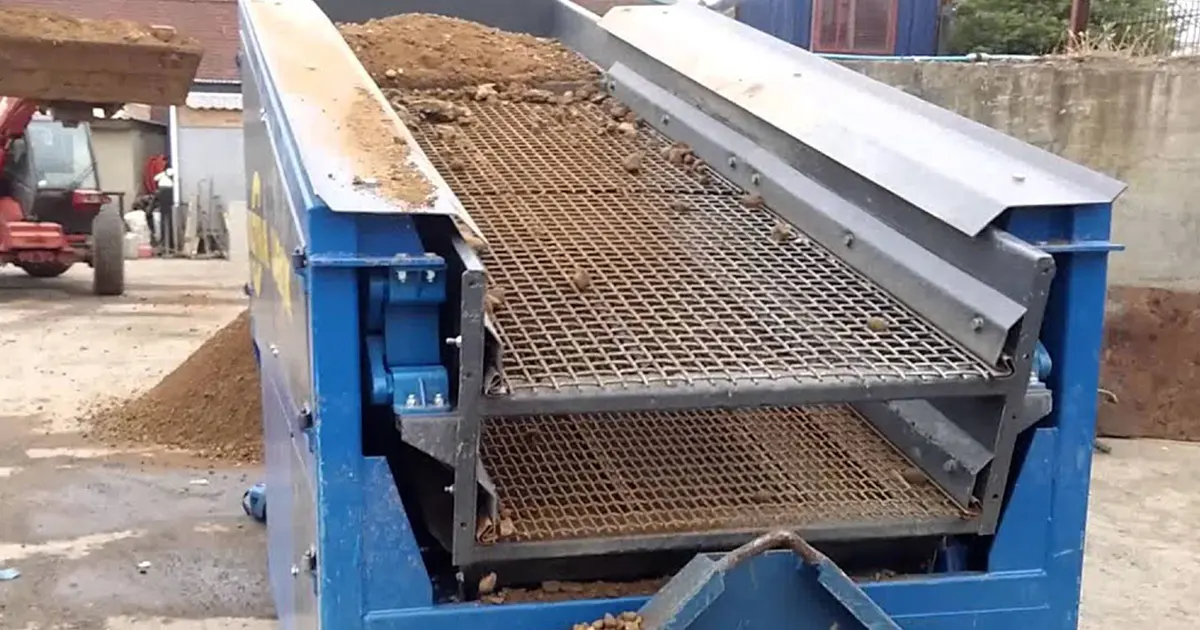
You might wonder why material sometimes moves too fast or too slow on your screen. The vibrating screen angle plays a huge role in this. When you adjust the angle, you change how particles move and separate.
- The angle of inclination affects efficiency a lot.
- A steeper angle means fewer particles pass through.
- Horizontal screens usually give better results.
You can get the best screening at about 15°, so even small changes matter.
Key Takeaways
- The vibrating screen angle changes how material moves and separates. Changing the angle can make the process work better.
- The best angle for screening is usually between 15° and 20°. This range keeps the speed and holds the material well.
- Steeper angles (20°-25°) let more material pass through. But they may not separate as well. Use these angles for sticky materials.
- Flatter angles (10°-15°) are good for separating fine materials. But they can make the process slower.
- Check the screen angle often with an inclinometer. Small changes can make the screen work better.
- Different materials need different angles. Pick the right angle for the material to get the best results.
- Watch for signs of clogging or bad separation. Change the angle if material piles up or moves too fast.
- Use flexible screen panels for wet or sticky materials. They help keep the material moving and cut down on stoppages.
Vibrating Screen Angle Basics
What Is Screen Angle
You might hear people talk about the vibrating screen angle, but what does that really mean? The screen angle is the tilt of the screen surface compared to a flat, level ground. Imagine you have a table. If you lift one side, you create an angle between the tabletop and the floor. That’s what happens with a vibrating screen. The angle helps decide how fast or slow material moves across the screen. When you set the right angle, you control how particles travel and separate. This angle is super important because it affects how well your screen works and how much material you can process.
How Angle Is Measured
You measure the vibrating screen angle by looking at the space between the screen surface and the horizontal plane. Most people use a simple tool called an inclinometer or a digital angle finder. You place the tool on the screen deck, and it tells you the angle in degrees. For example, if your screen sits flat, the angle is zero. If you tilt it up, the number goes higher. You want to check this angle often because even a small change can make a big difference in how your screen performs. If you notice material moving too quickly or not separating well, it’s a good idea to check the angle first.
Tip: Always measure the angle at the same spot on the screen for the most accurate results.
Typical Angle Range
You might wonder what angle works best. Most vibrating screens use an angle between 10 and 25 degrees. This range helps you get the right balance between speed and efficiency. If you use a steeper angle, like closer to 25 degrees, material moves faster. This can help you process more material, but it might not separate as well. If you use a lower angle, like 10 degrees, material stays on the screen longer, which can improve separation but slow down your process.
Here’s a quick look at common angle choices:
- Most inclined screens use 15° to 30°.
- A 20° angle works well for pre-screening and sizing.
- This range helps particles spread out and separate by size.
You want to pick an angle that matches your material and your goals. If you screen wet or sticky material, you might need a steeper angle to keep things moving. For dry, fine material, a lower angle can give you better results. The right vibrating screen angle helps you get the most out of your equipment.
Impact on Material Flow
Material Speed and Retention
When you adjust the vibrating screen angle, you change how fast material moves across the screen. A flatter screen lets particles move quickly because the openings look bigger from above. This means material spends less time on the screen. If you tilt the screen more, the openings seem smaller, so particles move slower and stay longer. You can think of it like sliding marbles down a ramp. A steep ramp slows them down because they hit more bumps, while a flat ramp lets them roll fast.
Effect on Layer Thickness
Layer thickness matters a lot in screening. If material moves too fast, it forms a thin layer. This thin layer helps small particles reach the screen surface and pass through. But if you set the angle too low, material piles up and forms a thick layer. This makes it harder for fine particles to reach the openings. You want to find the right balance. Too thin, and you lose control. Too thick, and you block the screen.
Tip: Check your screen regularly. If you see thick layers, try increasing the angle a bit to help spread out the material.
Particle Stratification
Stratification means how particles sort themselves by size as they move. The right vibrating screen angle helps particles spread out and separate. When you use a good angle, larger pieces rise to the top, and smaller ones sink down to the screen. This makes it easier for fine material to pass through.
Here’s a quick look at how angle affects particle behavior and efficiency:
| Angle (°) | Particle Behavior | Efficiency (%) |
|---|---|---|
| 0 | Vertical hopping, particles pile up | 93.6 |
| 30 | Good spreading and separation | 96.9 |
| 60 | Too much sliding, less separation | 91.9 |
You can see that around 30 degrees gives you the best mix of spreading and efficiency. If you screen dry rockfill, try 30 degrees. For wet or sticky material, 15 to 20 degrees works better.
- The angle usually ranges from 10 to 25 degrees.
- The right angle improves how well particles separate.
- Good stratification means more material passes through the screen.
Screen Opening and Efficiency
The angle also changes how big the screen openings look to the material. At 15 degrees, you get the best balance between speed and how long material stays on the screen. If you make the screen steeper, the openings get smaller, and fewer particles pass through. A horizontal screen often gives you the highest efficiency because particles have more time to find the openings.
| Screen Angle | Effect on Efficiency |
|---|---|
| 15 degrees | Best for screening, balances speed and retention |
| Steeper | Smaller openings, less material passes through |
| Horizontal | Most efficient, longest retention time |
You want to match the vibrating screen angle to your material and your goals. This helps you get the best results and keeps your process running smoothly.
Capacity vs Efficiency
Throughput Trade-Offs
You may want to move lots of material fast. If you try for more capacity, you might lose some accuracy. The vibrating screen angle decides how quickly material moves. A bigger angle makes material move faster. This gives you more throughput, but you might miss small particles.
Here’s a table showing what affects throughput:
| Key Influences | Effect on Throughput Capacity |
|---|---|
| Material flow velocity | Larger angles make material move faster but less accurate. |
| Screening efficiency | Smaller angles keep material longer but can cause buildup. |
| Material characteristics | Wet or sticky material needs a steeper angle to flow better. |
| Design Range | Screen deck angle is usually between 10° and 35°. |
You need to find the right balance. If the angle is too high, you get speed but lose accuracy. If it is too low, you get better separation but risk clogging.
Tip: Watch your material flow. If you see buildup, try a steeper angle.
Fine vs Coarse Screening
Screening fine and coarse material needs different angles. For coarse material, use a lower angle. Big particles move easily and do not block the screen. At 0°, big pieces stay on the screen, but fine particles have trouble passing through. Efficiency drops because fine particles get stuck.
If you increase the angle, fine particles pass through better. Efficiency for fine screening can reach up to 99.2% at the right angle. If the angle is too steep, like 60°, everything slides too fast and efficiency drops. Aim for an angle that gives you both speed and accuracy. Most screens work best between 10° and 30°.
Note: Try different angles for your material. Fine particles like a steeper angle. Coarse particles do well with a flatter screen.
Wet and Sticky Materials
Wet and sticky materials are hard to screen. These materials stick to the screen and block the openings. When this happens, efficiency drops and you need to clean the screen more.
Here’s a table to help with wet and sticky materials:
| Challenge | Solution or Recommendation |
|---|---|
| Sticky materials blind the screen | Use anti-clogging media that flex with vibration |
| Wet materials block openings | Increase angle to 15–20° for better movement |
| Frequent cleaning needed | Flexible panels help remove stuck material |
If you screen wet or sticky material, set your angle between 15° and 20°. This helps the vibration shake loose sticky stuff and keeps your screen working longer. Flexible panels also help by moving with the vibration and knocking off anything that sticks.
Tip: Check your screen often when running wet or sticky material. Adjust the angle and use flexible panels to keep things moving.
Problems from Incorrect Angle
Getting the vibrating screen angle wrong can cause a lot of headaches. You might see material moving too fast, clogging up, or not separating the way you want. Let’s look at what happens when the angle is either too steep or too shallow.
Too Steep
Fast Discharge
If you set the angle too steep, material rushes down the screen. It barely spends any time on the surface. You might think this helps you process more, but it actually hurts your results. Material flows so quickly that fine particles do not get a chance to pass through the openings. They just slide off the end with the bigger pieces. You lose valuable product and waste energy.
When the screen is too steep, you see fast discharge. Fine particles need more time on the screen to separate well. If they move too quickly, you miss out on proper screening.
Poor Separation
A steep angle also means poor separation. The material does not have time to spread out and stratify. Larger pieces do not rise to the top, and smaller ones do not reach the screen surface. You end up with a mix of sizes in your final product. This can cause problems if you need a certain size for your process or customer.
- You might notice more oversized material in your fines.
- The screen does not remove unwanted pieces as well.
- Your product quality drops.
Too Shallow
Clogging and Blinding
A shallow angle slows everything down. Material piles up and forms a thick layer. Fine particles get trapped under bigger ones and cannot reach the screen openings. This leads to clogging and blinding. The screen gets blocked, and you have to stop and clean it more often.
Reduced Throughput
When the angle is too flat, you process less material. The screen holds onto the material for too long. You lose capacity and slow down your whole operation. Here’s a table that shows what happens with different angles:
| Screen Angle | Effect on Material Processing |
|---|---|
| Shallow | Reduced screening efficiency and poor stratification |
| Steeper | Moves material faster but less time for stratification |
| Flatter | Slows flow and helps fine particles settle |
You want to avoid a shallow angle if you need high capacity or if your material tends to stick.
Unstable Results
If you do not set the vibrating screen angle correctly, you get unstable results. Sometimes you see too much material on the screen. Other times, everything moves too fast. Your product quality changes from batch to batch. You spend more time fixing problems and less time running your process.
Tip: Check your screen angle often. Small changes can make a big difference in how your screen works.
Getting the angle right helps you avoid these problems. You get better separation, higher capacity, and a smoother operation.
Optimizing Vibrating Screen Angle
When you want the best results from your screening process, you need to set the vibrating screen angle just right. Let’s break down what you should think about and how you can make smart adjustments.
Factors to Consider
Before you change anything, look at these important factors:
Material Type
Different materials behave in unique ways on a screen. Some flow easily, while others clump together or stick. You need to match the angle to the material’s nature.
| Angle Range | Material Type Description |
|---|---|
| Low Angles (10-15°) | Great for materials that move easily and don’t need much shaking. Good for coarse stuff. |
| Moderate Angles (15-20°) | Works for most materials. Balances speed and accuracy. |
| High Angles (20-25°) | Best for sticky or tough materials. Helps break up clumps and keeps things moving. |
Feed Size
Think about the size of the particles you’re screening. Big pieces move differently than fine ones. Coarse material usually needs a lower angle. Fine particles often do better with a steeper angle so they don’t pile up.
Moisture Content
Wet or damp material can stick to the screen and block the openings. If you deal with moisture, try a higher angle. This helps the material move and keeps the screen clear.
Product Size
What size do you want your final product to be? If you need fine separation, use a moderate to high angle. For larger product sizes, a lower angle often works well.
Capacity Needs
Do you want to process a lot of material quickly, or do you care more about getting the cleanest separation? A higher angle gives you more speed but less accuracy. A lower angle slows things down but can improve the quality of your product.
Tip: Always match your vibrating screen angle to your material and your goals. Small changes can make a big difference.
Adjustment Steps
Ready to adjust your screen? Here’s a simple step-by-step guide:
- Check Your Current Angle
Use an inclinometer or angle finder. Place it on the screen deck and note the reading. - Review Your Results
Watch how material moves. Is it piling up? Is it moving too fast? Are you getting the separation you want? - Adjust the Angle
- If material moves too slowly or clogs, raise the angle a little.
- If material rushes off the end, lower the angle.
- For circular vibrating screens, you can raise the rear support base to increase the angle.
- Test and Observe
Run the screen for a short time. Check the results. Look for better flow and cleaner separation. - Fine-Tune as Needed
Make small changes. Even a few degrees can change everything.
Note: Most screens work best between 16° and 20°. Avoid going below 16°, or you might see blockages.
Best Practices
You can get the most out of your vibrating screen by following these tips:
- Use moderate angles (15-20°) for most jobs. This gives you a good mix of speed and accuracy.
- Try higher angles (20-25°) for sticky or hard-to-screen materials.
- Test different angles with your material. Every setup is a little different.
- Use simulation tools or ask your screen manufacturer for advice if you’re not sure.
- Keep an eye on your screen’s performance. Make small adjustments as needed.
- Don’t forget to check the angle regularly. Vibration and wear can change it over time.
Pro Tip: Continuous monitoring helps you spot problems early. Adjust the angle before small issues become big headaches.
When you pay attention to these details, you get better screening, higher capacity, and a smoother operation. The right vibrating screen angle helps you handle any material with confidence.
Screen Surface and Angle
The type of screen surface you choose works together with the angle of your vibrating screen. If you want the best results, you need to match both to your material and your goals. Let’s look at the main screen media types and see how they interact with angle.
Screen Media Types
Woven Wire Mesh
You see woven wire mesh on many screens. It’s made of metal wires woven together, making lots of open space for material to pass through. This type gives you high throughput because it has a bigger open area. You can use it for most dry materials. If you want to move a lot of material fast, woven wire mesh helps. But it wears out faster and can clog if you screen sticky or wet stuff.
Polyurethane Panels
Polyurethane panels look solid, but they have slots or holes for screening. These panels last longer than wire mesh. They resist wear and don’t clog as easily. If you work with wet or abrasive materials, polyurethane panels are a smart choice. You might notice a little less throughput because the open area is smaller, but you get less downtime for cleaning and repairs.
Here’s a quick comparison:
| Feature | Woven Wire Mesh | Polyurethane Panels |
|---|---|---|
| Open Area | Higher open area for better throughput | Lower open area |
| Wear Life | Shorter wear life | Longer service life |
| Resistance to Clogging | Less resistant to blinding and pegging | More resistant to blinding and pegging |
| Suitable Applications | General applications | Wet or abrasive applications |
Self-Cleaning Screens
Self-cleaning screens use special wires or flexible panels that move with the vibration. These screens shake off sticky material and keep the openings clear. If you deal with tough, sticky, or damp material, self-cleaning screens can save you a lot of time.
Perforated Plate
Perforated plates are solid sheets with holes punched in them. They last a long time and handle heavy, sharp material well. You might use these for tough jobs where you need strength more than speed.
Angle and Media Interaction
The angle of your screen and the type of media you use work together. Here’s how:
- If you set a double inclination, like 10–15° at the start and 20–30° further down, you create a free-fall effect. Material doesn’t pile up. It falls straight through the openings, which boosts capacity.
- Vibration helps sort material by size and density. Small pieces drop to the bottom and pass through. Big pieces stay on top and move along the deck.
- If you increase the angle, material moves faster. This works well for dry screening. But if you go too steep, small particles might roll off instead of passing through.
- You can adjust both linear and triple-shaft horizontal screens to get more capacity and better results.
Tip: Try different angles and media types to see what works best for your material. Sometimes a small change makes a big difference.
Limits of Angle Adjustment
Every vibrating screen has limits for how much you can adjust the angle. The design of your equipment sets these limits. Most screens use angles between 10° and 30°. Some screens have sections with different angles, like -2.5°, 15°, 30°, or even 45°. The angle changes how material moves and separates. If you go outside the recommended range, you might see poor separation or even damage your screen.
Note: Always check your equipment manual before making big changes. The right angle keeps your screen running smoothly and helps you get the best results.
When you match your screen surface and angle, you get better screening, less downtime, and higher quality material.
Conclusion
You can boost your screening results by paying close attention to vibrating screen angle. Here’s why it matters:
- The angle controls how particles move, which affects both efficiency and product quality.
- Different materials need different angles for the best separation and throughput.
- The right angle helps particles spread out and pass through the screen.
| Direction Angle | Efficiency | Recommendation |
|---|---|---|
| 0° | 93.6% | Increase angle for better flow |
| 30° | 96.9% | Great for dry rockfill |
| 60° | 91.9% | Too steep for most jobs |
You should always match your screen surface and angle. If you need help, I can recommend the best setup for your material. Try small changes and keep checking your results. You’ll see better performance in no time!
FAQ
What is the best angle for a vibrating screen?
You get the best results with an angle between 15° and 20°. This range works for most materials. Try small changes to see what fits your process.
How do I measure the screen angle?
You can use an inclinometer or a digital angle finder. Place it on the screen deck. Read the number in degrees. Always check the same spot for accuracy.
Why does my screen keep clogging?
A shallow angle can cause material to pile up and block the openings. Try raising the angle a little. You can also use self-cleaning screen panels.
Can I use the same angle for all materials?
No, you should adjust the angle for each material. Sticky or wet materials need a steeper angle. Dry, coarse materials work better with a lower angle.
How often should I check the screen angle?
Check the angle every week or after any maintenance. Vibration and wear can change the angle over time.
What happens if the angle is too steep?
Material moves too fast. Fine particles do not separate well. You lose product and may see poor quality.
Do screen surface types affect the angle I should use?
Yes! Woven wire mesh works well at moderate angles. Polyurethane panels and self-cleaning screens help with sticky materials at steeper angles.
Can I adjust the angle while the screen is running?
You should stop the machine before making adjustments. This keeps you safe and protects your equipment.