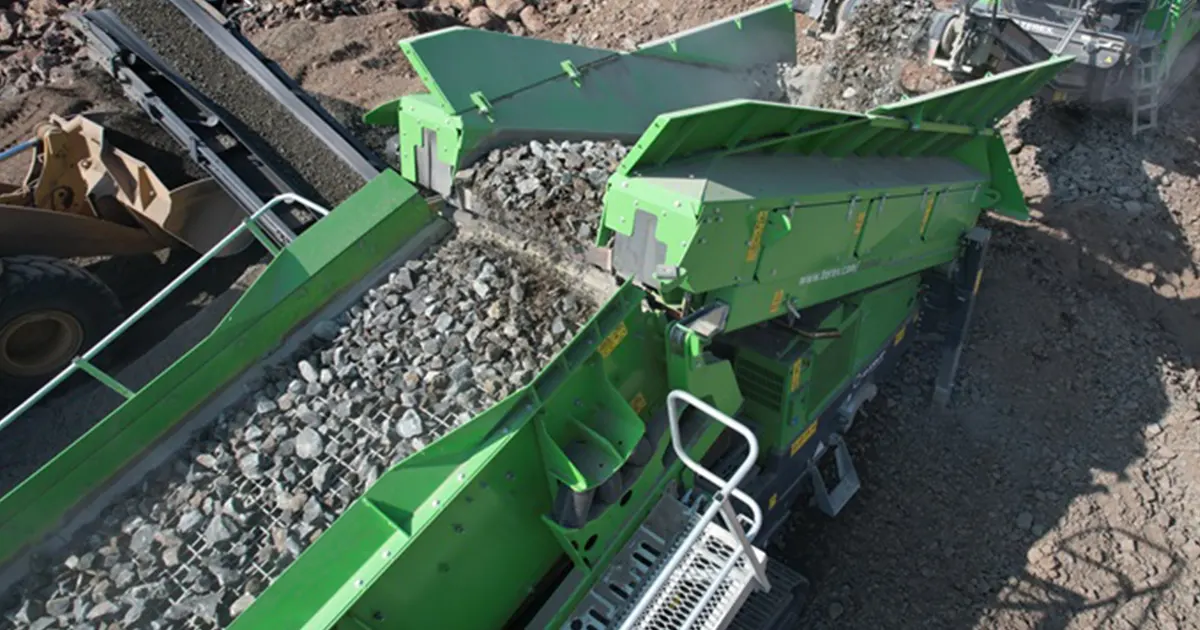
If you have vibrating screen low throughput, problems can get worse fast. You see your plant work less and costs go up. Here is what happens in your plant:
| Factor | Impact on Throughput and Costs |
|---|---|
| Low Throughput | Makes work less efficient and costs more money. |
| Material Buildup | Makes separation bad and uses more energy. |
| Increased Downtime | Needs more repairs, which costs more money. |
| Higher Energy Consumption | Happens when the screen does not work well. |
| Labor Costs | Go up because of more repairs and downtime. |
You want fast answers and real solutions. Let’s help you fix things.
Key Takeaways
- Low throughput in vibrating screens can waste time and money. Fix problems as soon as you see them.
- Low throughput often happens because of wrong mesh size, blinding, or bad material spread. Check your screen often to find these problems.
- Change the mesh size to fit your material. This can help throughput a lot. A fast change can show quick results.
- Keep your screen clean and in good shape. This stops blinding and clogging. Clean it often for best results.
- Watch the vibration settings carefully. Set amplitude and frequency right to help material move and separate better.
- Make sure the feed rate is balanced. Do not put too much material on the screen. This keeps things working well and stops buildup.
- Think about getting new screen media. Newer media lasts longer and works better. This can give you more throughput and less downtime.
- Check your screen often for maintenance. This stops small problems from getting worse. Stay ahead to keep your plant working well.
What Is Vibrating Screen Low Throughput?
Definition and Symptoms
You might wonder what vibrating screen low throughput really means. It happens when your vibrating screen does not process as much material as it should. You notice the screen just cannot keep up with the demand. This problem shows up in a few clear ways.
- Material starts plugging the holes on the screen. This is called blinding. You see the screen surface covered, and nothing passes through.
- Loads on the screen become unbalanced. One side might have more material than the other.
- The screen cannot handle enough material. You see piles building up, and the process slows down.
Tip: If you spot these signs, act fast. Small problems can turn into big headaches if you ignore them.
Effects on Plant Operations
When you deal with vibrating screen low throughput, your whole plant feels the impact. You do not just lose speed. You also face other challenges.
- The feed rate changes how well your screen works. If you push too much material, the screen gets overloaded. If you feed too little, you waste time and energy.
- Low throughput means your screen cannot separate materials well. You end up with mixed or contaminated product streams.
- Your costs go up. You spend more on energy and labor because the process takes longer.
- Equipment can get damaged. When material does not size right, it puts stress on other machines.
- Bottlenecks form in your process. Everything slows down, and product quality drops.
You want your plant to run smoothly. When your screen slows down, everything else does too. Watch for these effects, and you can fix problems before they get worse.
Main Causes of Low Throughput
Incorrect Mesh Size
You might think picking any mesh size will work, but it makes a big difference. If you choose a mesh that is too small, your screen will catch more material. This sounds good for accuracy, but it slows everything down. The screen cannot handle as much material, and you get less product out. If you pick a mesh that is too large, you get more material through, but you lose precision. Sometimes, fine material slips through when it should not.
When you use a very fine mesh, sticky or wet material can clog the holes. This makes the screen even slower. You see piles of unscreened material, and the process stops moving. Dry material works better because it moves freely and does not stick. Always match your mesh size to your material and your production goals.
Tip: Check your mesh size if you notice vibrating screen low throughput. A quick change can boost your output.
Blinding and Pegging
Blinding and pegging are common screening problems that slow down your plant. Blinding happens when fine particles cover the screen holes. Pegging is when larger pieces get stuck in the holes. Both problems block material from passing through. You see the screen surface fill up, and nothing moves.
Wet or sticky material makes blinding worse. The screen deck angle and open area also play a role. If the angle is too flat, material sits on the screen longer and has more time to clog the holes. If you do not clean the screen often, blinding and pegging get worse. You end up stopping the machine to clear the screen, which means more downtime and less production.
- Wet material causes clumping and sticking.
- Clogging slows down the screening process.
- Dry material moves better and keeps the screen clear.
Note: Regular cleaning and checking the deck angle can help prevent blinding and pegging.
Worn Screen Media
Screen media wears out over time. When the screen surface gets thin or damaged, it cannot separate material well. You might see more undersized material in your oversize pile, or vice versa. This means your screen is not doing its job, and your plant loses efficiency.
Worn screen media also lets more material pass through without proper separation. You get more carryover, and your product quality drops. If you do not replace worn screens, you risk bigger problems like bearing failures or even side plate cracking. Loose bolts and seals can also show up when the screen media is not in good shape.
- Poor separation and increased carryover
- Lower efficiency and more downtime
- Need for regular inspection and timely replacement
Alert: Always inspect your screen media. Replace it before it causes bigger issues.
Poor Material Distribution
You may not see poor material distribution right away, but it can cause big problems for your vibrating screen. When material does not spread evenly, some parts of the screen get too much material and others get too little. This makes the flow uneven and separation does not work well. You might notice piles on one side, and the screen works harder in certain spots.
Take a look at how poor distribution affects your plant:
| Challenge | Description |
|---|---|
| Inconsistent Material Flow | Poor distribution causes uneven flow across the screen. |
| Low Screening Efficiency | Bad material spread lowers separation and efficiency. |
| Excessive Wear | Material buildup and uneven load wear out the screen faster. |
If material piles up in one spot, the screen wears out more quickly. You spend more time fixing parts and less time running your plant. You can fix this by checking your feed system and making sure material spreads evenly. Adjusting the feed chute or using flow control valves helps balance the load. When material moves smoothly, you avoid common screening problems and get more throughput.
Tip: Watch the screen while it runs. If you see piles, adjust your feed to spread material across the whole surface.
Moisture and Sticky Material
Moisture in your feed material can slow down your screening process. Wet material sticks together, making it hard for particles to pass through the screen. Sticky material blocks the mesh and reduces the open area. You see less material coming out, and downtime goes up because you need to clean the screen more often.
Here’s what happens when moisture and sticky material cause vibrating screen low throughput:
- High moisture makes particles stick together, which lowers screening efficiency.
- Clumped particles are bigger than single ones and have trouble passing through screen holes, so throughput drops.
- Wet materials can stick to the screen mesh, blocking holes and lowering the screening area, which causes downtime.
You can fix this by keeping your feed dry and cleaning the screen often. If you work with sticky material, use screen media made for wet conditions. Changing the deck angle also helps material move faster and stops buildup.
Alert: If you see wet or sticky material on your screen, clean it right away. This keeps your process moving and stops bigger problems.
Improper Vibration Settings
You might think vibration settings are easy, but they matter a lot for your screen. If you set the vibration wrong, material does not move as it should. You see less material passing through, and throughput drops. The screen deck angle must match the vibration frequency to keep material flowing.
Here’s what happens when vibration settings are off:
- If vibrations are not set right, materials may not pass through the screen well, so throughput goes down.
- The inclination angle of the screen must match the vibration frequency to get good material flow.
- Wrong amplitude can make separation bad, and too much amplitude can wear out screen parts.
- Incorrect vibrating settings, like amplitude, frequency, or angle, can lower screening efficiency.
- Changing these settings is important for getting the best throughput.
You can fix this by running a vibration check. Look at the screen box speed and make sure springs and fasteners are tight. Adjust the amplitude and frequency until material flows smoothly. When you set vibration right, you avoid common screening problems and keep your plant running well.
Note: Always check vibration settings after maintenance or if you notice changes in throughput. Small changes can help a lot.
Overloaded Feed
You might think more material means more output, but that’s not always true. When you feed too much material onto your vibrating screen, you actually slow things down. The screen can’t handle the extra load, so you see problems right away.
- Too much material blocks the holes in the screen. Nothing gets through, and your throughput drops.
- Wet material makes things worse. It sticks together and clogs the screen even faster.
- If you feed material unevenly, some parts of the screen get overloaded while others barely work. This makes your operation less efficient and lowers your output.
You can spot overloaded feed by watching for piles on the screen or slow movement. If you see these signs, try adjusting your feed rate. Make sure material spreads evenly across the screen. You can also check your flow control valves and feed chute. When you balance your feed, you help your screen work better and avoid downtime.
Tip: Keep an eye on your feed rate. If you notice vibrating screen low throughput, check if you’re overloading the screen.
Insufficient Screening Area
If your screen doesn’t have enough area, you run into trouble fast. The material crowds together, and particles don’t have space to move. This makes it hard for smaller pieces to pass through the holes.
- Not enough screening area causes overcrowding. Particles pile up and block each other.
- When particles crowd together, undersized material can’t pass through the screen. You lose efficiency.
- This blockage lowers your throughput and slows down your whole process.
You can fix this by expanding your screening area or adding more screen decks. Sometimes, changing the deck angle helps material move faster. If you notice piles or slow movement, check your screen size and open area. When you give material more space, you boost your output and keep your plant running smoothly.
Note: If you see material piling up, your screen might be too small for your feed. Consider upgrading to a larger screen or adding another deck.
Impact on Vibrating Screen Efficiency
Mesh Size and Separation
You might not realize how much mesh size affects your results. When you pick the right mesh size, you control what passes through and what stays on top. If you use a smaller mesh, you catch more fine particles. This helps you get better separation and cleaner products. But, there’s a trade-off. Smaller mesh sizes slow down the flow. You process less material, and your throughput drops. On the other hand, a larger mesh lets more material through. You get higher capacity, but you lose some accuracy in separation.
Changing mesh size is a powerful tool. You can target the exact particle size you want. This flexibility boosts your recovery rates and helps you handle different materials without buying new equipment. If you want to improve vibrating screen efficiency, always match your mesh size to your material and your goals.
Tip: Review your mesh size often. Small changes can make a big difference in both throughput and separation.
Blinding and Material Flow
Blinding is a common headache in screening. It happens when particles block the holes in your screen. When this occurs, the open area shrinks, and less material gets through. You see your throughput drop, and the screen can’t do its job well. Sticky or wet particles make blinding worse. Fine meshes clog faster, which means you need to clean the screen more often.
Here’s what blinding does to vibrating screen efficiency:
- Blocks screen holes and reduces open area.
- Lowers throughput, so less material gets processed.
- Causes unwanted fines to build up in your product.
- Makes you stop for cleaning and maintenance more often.
If you let blinding go unchecked, your whole process slows down. You might even see fines end up in the wrong stream, which hurts your product quality. Watch for sticky spots and keep your screen clean to keep things moving.
Screen Media Wear
Screen media doesn’t last forever. Over time, the surface wears down from constant use. When this happens, the screen can’t separate material as well. You might notice more carryover or mixed products. Worn screen media also lets larger particles slip through, which lowers your vibrating screen efficiency.
If you ignore worn screens, you risk bigger problems. The screen can break, and you might have to stop production for repairs. Regular checks and timely replacement keep your screen working at its best. You save time, money, and avoid unplanned downtime.
Alert: Don’t wait for a breakdown. Replace worn screen media before it affects your throughput and efficiency.
By paying attention to mesh size, blinding, and screen media wear, you can keep your vibrating screen efficiency high and your plant running smoothly.
Distribution and Bed Depth
You might not notice right away, but how material spreads across your screen matters a lot. If you feed material unevenly, some spots get overloaded while others barely work. This uneven spread lowers vibrating screen efficiency. You want every part of your screen working together.
- Proper feed distribution helps material move evenly. You get better separation and more product.
- If the bed is too deep, fine particles stay on top and never reach the screen holes. This means you miss out on good separation.
- A shallow bed can waste space. You don’t use the whole screen, so you lose throughput.
- When you control bed depth, you help fine particles move closer to the screen deck. This boosts vibrating screen efficiency.
Feed rate also changes bed depth. If you push too much material, the bed gets thick and slows down separation. If you feed too little, you don’t use your screen’s full power. You need balance. Watch your feed system and adjust as needed. When you get distribution and bed depth right, you see more material processed and better results.
Tip: Check your feed chute and flow control valves often. Small changes can make a big difference in vibrating screen efficiency.
Moisture Effects
Moisture in your material can cause big problems for your screen. Wet particles stick together and form clumps. These clumps block the screen holes and slow down separation. You see less material coming through, and your throughput drops.
- High moisture makes particles clump. Clumped particles are bigger and don’t pass through the screen easily.
- Wet material blocks the screen, which means you spend more time cleaning and less time running your plant.
- Low moisture lets particles move freely. You get higher throughput and better vibrating screen efficiency.
If you work with clay or sticky minerals, moisture makes things worse. You might see misclassified particles and poor separation. In industries where you need precise results, like pharmaceuticals, high moisture can ruin your product. Keep your feed dry when you can. Clean your screen often if you deal with wet material.
Alert: If you see wet spots or clumps on your screen, act fast. Cleaning and drying your feed helps keep vibrating screen efficiency high.
Vibration and Stratification
Vibration settings play a huge role in how your screen works. If you set the frequency and amplitude right, you help material stratify. Stratification means fine particles move down to the screen deck, while bigger ones stay on top. This process boosts vibrating screen efficiency.
- High frequency helps separate fine particles. You get cleaner products and more throughput.
- Low frequency and high amplitude work best for coarse materials. You see better separation and less carryover.
- If you set vibration wrong, material doesn’t stratify. Fine particles stay mixed with coarse ones, and you lose efficiency.
- Adjusting vibration can also help with moisture problems. The right settings break up clumps and stop blinding.
You need to match vibration settings to your material. If you change your feed, check your vibration parameters. Small tweaks can improve throughput and keep your plant running smoothly.
Note: Run a vibration check after maintenance or when you change material types. Good stratification means high vibrating screen efficiency.
Overloading and Bypassing
When you put too much material on your vibrating screen, you run into big problems. Overloading does not just slow things down. It can cause material to bypass the screen altogether. You end up with mixed piles that are hard to sort later. This makes your job harder and hurts vibrating screen efficiency.
Here’s what happens when you overload your screen:
- Smaller particles cannot fall through the holes because there is too much material on top.
- You see mixed piles of different sizes, which makes the next steps in your process more difficult.
- The extra weight can clog and blind the screen, so less material gets through.
- Overloading lowers the accuracy of size separation. You get more mistakes and less control.
- If you keep overloading, the screen can block completely. This stops your plant and causes big delays.
You want to avoid these issues. Watch your feed rate and make sure you do not put too much material on the screen at once. When you keep the load balanced, you help vibrating screen efficiency stay high. If you notice piles building up or material moving slowly, it is time to check your settings.
Tip: Always check for even material flow. If you see one side of the screen working harder, adjust your feed system right away.
Area Limitations
The size of your screen matters more than you might think. If your vibrating screen does not have enough area, you cannot process all the material you need. Particles crowd together, and smaller pieces get trapped on top. This lowers vibrating screen efficiency and slows down your whole operation.
Here’s how area limitations affect your results:
- Not enough screen area means particles pile up and block each other.
- When the screen gets crowded, fine material cannot reach the holes and pass through.
- You see more carryover, which means good material ends up in the wrong pile.
- Your throughput drops, and you spend more time fixing problems.
If you want to boost vibrating screen efficiency, look at your screen size. Sometimes, adding another deck or choosing a screen with more open area can help. You can also adjust the deck angle to help material move faster. When you give particles more space, you get better separation and higher output.
Note: If you see material building up or moving slowly, your screen might be too small for your needs. Upgrading to a larger screen can make a big difference in vibrating screen efficiency.
Diagnosing Low Throughput Issues
Troubleshooting Steps
You want to fix low throughput fast. Start with a clear plan. When your screen slows down, look for the most common symptoms and causes. Here’s a simple table to help you get started:
| Symptom | Likely Causes | What to Check First |
|---|---|---|
| Throughput drops | Dull knives, wide clearance, screen blinded, pusher not loading | Knife condition and screen cleanliness |
| Low Throughput (But the Machine “Runs”) | N/A | Inspect the knives and counter knife, Check the screen basket, Confirm the pusher actually loads the rotor |
You can use this table as a quick reference. If you see throughput drop, check the knives and screen for dirt or damage. If your machine runs but throughput stays low, look at the screen basket and make sure the pusher loads the rotor. Always start with these basic checks before moving on.
Tip: Keep a troubleshooting checklist handy. It saves time and helps you spot problems early.
Visual Inspection
You can learn a lot just by looking at your screen. Walk around the machine and check for obvious signs. Look for material buildup, blinding, or pegging on the screen deck. If you see piles of material or blocked holes, you know something is wrong.
Check the feed chute. Make sure material spreads evenly across the screen. Uneven piles mean poor distribution. Look at the springs and fasteners. Loose or broken parts cause vibration problems and lower throughput. If you spot worn screen media, plan to replace it soon.
- Look for blocked holes and material buildup.
- Check for uneven feed and piles on the screen.
- Inspect springs, fasteners, and screen media for wear.
Alert: If you see anything unusual, stop and fix it right away. Small issues can turn into big repairs if you ignore them.
Vibration Analysis
You can use vibration analysis to find hidden problems. This method checks how your screen moves and helps you spot issues that aren’t easy to see. Vibration analysis measures amplitude, frequency, and patterns.
- Amplitude must stay within the right range. If it’s too low or too high, your screen won’t separate material well.
- Frequency changes based on your material. Fine materials need higher frequencies for good screening.
- Uneven vibration patterns cause poor material distribution. You see inconsistent results and lower throughput.
You can use a vibration meter or sensor to check these settings. If you notice strange readings, adjust the screen box speed or tighten springs and fasteners. When you set vibration right, material flows better and throughput goes up.
Note: Run vibration checks after maintenance or when you change material types. It helps you keep your screen working at its best.
Feed Rate Assessment
You want your vibrating screen to work at its best. Checking the feed rate is a big part of that. If you feed too much or too little material, your screen will not separate things well. You might see piles build up or notice that fine particles do not pass through. Here are some simple ways to assess your feed rate and spot problems early:
- Watch the material flow: Stand by the screen and look at how material moves across the deck. If you see thick piles or empty spots, your feed rate needs adjustment.
- Check particle size distribution: The size of the particles in your feed changes how well your screen works. If you have a mix of big and small pieces, you might need to adjust your settings. Optimizing particle size can help you get better results.
- Monitor vibration and structural settings: Frequency, amplitude, and screen aperture all affect how much material your screen can handle. If you change your feed rate, check these settings too.
- Use technology: Some plants use Discrete Element Method (DEM) simulations. These tools help you see how different particle types and feed rates affect screening efficiency. You can use this data to make smart changes.
- Adjust flow control valves: If your screen has flow control valves, use them to balance the feed. This helps spread material evenly and keeps your throughput high.
Tip: Keep a log of your feed rate and any changes you make. This helps you spot patterns and fix problems faster.
Maintenance Checks
Regular maintenance keeps your vibrating screen running smoothly. If you skip these checks, you risk low throughput and costly repairs. Here’s a quick table to show you what to look for and why it matters:
| Maintenance Check | Importance |
|---|---|
| Bearing Checks | Prevents big failures by making sure bearings are lubricated and not worn out. |
| Drive Belt Inspection | Keeps power moving to the screen by checking for wear and proper tension. |
| Screen Panel Replacement | Makes sure your screen separates material well by replacing worn or damaged panels. |
| Cleaning Ball Inspection | Stops clogging by checking that cleaning balls are in good shape and right for your material. |
| Structural Checks | Finds cracks or damage early so you can fix them before they cause bigger problems. |
You should check these parts often. If you find a problem, fix it right away. Clean your screen panels and make sure all bolts and fasteners are tight. When you keep up with maintenance, you avoid downtime and keep your plant running strong.
Alert: Never ignore strange noises or vibrations. These signs mean something needs attention. Quick action saves you time and money.
Solutions to Improve Throughput
Adjust Mesh Size and Open Area
You can boost your vibrating screen efficiency by picking the right mesh size and open area. Mesh size controls what particles pass through. If you use a finer mesh, you catch smaller pieces. This helps you get cleaner separation, but it can slow down your process. A coarser mesh lets bigger particles through, which is great for high throughput processing. You need to match mesh size to your material and your goals.
Open area matters too. The more openings you have, the easier it is for material to pass through. If you increase the ratio of openings to the total screen surface, you give particles more chances to drop through. This simple change can make your screen work faster and handle more material. You want to check your mesh size and open area often. Small tweaks can make a big difference in how to solve them.
Tip: If you notice slow movement or piles building up, try changing your mesh size or open area. You might see your throughput jump right away.
Clean and Maintain Screen Deck
Keeping your screen deck clean and well-maintained is key to vibrating screen efficiency. Dirt, dust, and sticky material can block holes and slow down your process. You want to stop buildup before it becomes a problem. Here are some best practices:
- Inspect your screen for proper alignment. Make sure the holes are not distorted.
- Keep clear space around your machine. This makes it easy to adjust and inspect.
- Use the right lubricants. Check that they are not burnt or dirty.
- Lubricate parts regularly, following the manufacturer’s advice.
- Clean around moving parts. Dirt and contaminants can cause efficiency loss.
- Check belt tension. If belts slip or squeal, fix them fast.
- Make sure your screen has good support. Uniform tension keeps the screen working well.
- Inspect cross-members and drive systems for wear.
- Cover housing tubes and decking to protect your screens.
- Clean the screen panel as recommended. This keeps efficiency high.
- Log all maintenance. Good records help you plan future checks.
If you follow these steps, you keep your screen running strong. You avoid downtime and get more material through your process.
Alert: Never ignore strange noises or vibrations. These signs mean something needs attention. Quick action keeps your plant safe and efficient.
Optimize Deck Angle
Changing the deck angle can help you get better results from your vibrating screen. The angle affects how fast material moves and how well particles separate. If you use a lower angle, like 10 to 15 degrees, material moves slowly. This works well for easy-flowing materials. If you need to handle sticky or tough material, a higher angle, like 20 to 25 degrees, speeds up movement and helps with separation.
A higher angle also improves stratification. This means fine particles move down to the screen deck, while bigger ones stay on top. You get better separation and higher vibrating screen efficiency. Studies show that the best screening happens at about 15 degrees. If you go too steep, particles move fast but spend less time on the screen. They might not pass through the holes, and your efficiency drops.
Note: Adjust your deck angle based on your material. If you see slow movement or poor separation, try changing the angle. You might find the sweet spot for your process.
| Deck Angle (Degrees) | Material Movement | Best For |
|---|---|---|
| 10-15 | Slow | Easy-flowing materials |
| 20-25 | Fast | Sticky/tough materials |
| ~15 | Balanced | Maximum efficiency |
If you keep your deck angle optimized, you help your screen process more material and improve separation. This simple change can make your plant run smoother and faster.
Balance Feed Rate
You want your vibrating screen to work at its best. Getting the feed rate right is one of the most important steps. If you push too much material onto the screen, you overload it. This causes a thick bed of material that blocks particles from reaching the screen surface. Throughput drops, and you lose control over separation.
Here’s what you can do to balance your feed rate and boost vibrating screen efficiency:
- Set your main goal first. Do you want maximum throughput, or do you need the cleanest separation? Your answer will guide your feed rate.
- Watch your material. If it’s sticky or has lots of moisture, slow down the feed. Wet or dense material needs more time to move across the screen.
- Adjust the feed rate for different particle sizes. Fine material flows differently than coarse material. Make changes as needed.
- Use a steeper deck angle and higher G-force if you want more throughput. Just remember to check your product quality.
- Keep an eye on the flow. If you see piles or empty spots, adjust your feed system right away.
You can also use flow control valves or feeders to help manage the rate. When you match the feed rate to your material, you avoid clogging and keep your process smooth. This simple step makes a big difference in vibrating screen efficiency.
Tip: Always check your feed rate after changing material or making repairs. Small tweaks can solve big problems.
Upgrade Screen Media
Upgrading your screen media is a smart move if you want better results. Newer screen panels can handle more material, last longer, and keep your plant running with less downtime. You get more out of your equipment and spend less time fixing problems.
Here’s why upgrading screen media helps:
- You optimize screen performance and get more consistent results.
- You prevent avoidable downtime by catching problems early.
- You extend the life of your screen and other equipment.
- Certified technicians can visit your site and use diagnostic tools to spot issues before they get worse.
- You get advice from experts who know your material and process.
- Early signs of wear are easier to spot with new media. This lets you plan change-outs and avoid sudden breakdowns.
- Upgrades reduce waste and improve safety for your team.
- New screen media can show you how the screen moves and help you understand screening dynamics. This limits wear and cuts downtime costs.
If you want to improve vibrating screen efficiency, look at your screen media first. Upgrading is one of the fastest ways to see better throughput and fewer headaches.
Note: Schedule regular checks with a technician. They can help you pick the right media for your material and show you how to solve them.
Adjust Vibration Settings
Vibration settings control how your screen works. If you set the amplitude and frequency right, you help material move and separate better. You want to match these settings to your material and your goals.
Here’s how you can adjust vibration settings for better vibrating screen efficiency:
- Check the amplitude. Too much can damage your screen, but too little won’t move material well.
- Set the frequency based on your material. Fine particles need higher frequencies, while coarse material does better with lower ones.
- Make sure the screen box speed matches the deck angle. This keeps material moving smoothly.
- Tighten springs and fasteners. Loose parts can cause uneven vibration and lower efficiency.
- Run a vibration analysis after maintenance or when you change material types. This helps you spot problems early.
When you get vibration settings right, you see more material processed and better separation. You also avoid extra wear and keep your plant running longer.
Alert: If you hear strange noises or see uneven movement, stop and check your vibration settings. Quick action keeps your screen in top shape.
Expand Screening Area
Sometimes your vibrating screen needs more space to work well. If you see material piling up or moving slowly, your screen might be too small. Giving particles more room helps them move and separate better. This simple fix can really help your plant make more product.
You can expand your screening area in a few ways:
- Upgrade to a larger screen: If your screen is always crowded, a bigger one can handle more material.
- Add extra screen decks: Stacking more decks gives you more area without using much more floor space. Each deck can sort a different size, so you get better separation.
- Choose screens with higher open area: Some panels have more holes in each square foot. This lets more material go through, even if the screen is the same size.
- Use modular screen panels: These panels let you swap out sections for different jobs. You can change your screen for each type of material.
Tip: Before buying a bigger screen, check your setup. Sometimes, you can move or replace panels to get more open area without buying a new screen.
Here’s a table to help you pick the best option for your plant:
| Solution | Best For | What You Gain |
|---|---|---|
| Larger Screen | High-volume operations | More capacity, fewer piles |
| Extra Decks | Limited floor space | Better separation, flexibility |
| Higher Open Area Panels | Sticky or fine materials | Faster screening, less clogging |
| Modular Panels | Changing material types | Easy swaps, less downtime |
When you make your screening area bigger, fine particles can reach the screen surface. This helps you get more product and better quality. You also lower the chance of overloading, so you have less downtime and fewer repairs.
Remember to check your support structure and drive system before you make changes. Bigger or heavier screens need strong support and the right vibration settings. If you are not sure, ask your screen manufacturer for help. They can help you choose the best way to fix your problem.
Alert: If you see material building up or your screen always working at full load, you should think about getting a bigger area. Expanding your screening area can fix low throughput and keep your plant running well.
When to Change Screen Media
Signs of Wear
You want your vibrating screen to work its best. Worn screen media can slow everything down. You might see a few clear signs that tell you it’s time for a change.
- Holes or tears: If you spot holes or rips in the screen, material will pass through the wrong way.
- Thinning or shiny spots: These spots show where the screen has worn down. Material can slip through or get stuck.
- Loose panels or fasteners: If panels move or bolts come loose, the screen will not separate material well.
- Unusual noises: Squeaks, rattles, or banging sounds mean something is wrong.
- More carryover: If you see more large pieces in your fines or fines in your oversize, the screen is not doing its job.
Tip: Walk around your screen every day. A quick look can save you from big problems later.
Choosing the Right Media
Picking the right screen media makes a big difference. You want to match your media to your material and your plant’s needs.
Here’s a simple table to help you choose:
| Material Type | Best Media Choice | Why It Works |
|---|---|---|
| Wet/Sticky | Polyurethane or Rubber | Resists blinding and clogging |
| Abrasive | Woven Wire or Steel | Handles tough materials |
| Fine Screening | Fine Mesh or Self-cleaning | Keeps small particles moving |
| Heavy Loads | Heavy-duty Panels | Lasts longer under stress |
You can also ask your screen media supplier for advice. They know what works best for your setup.
Note: If you change your material or process, check if your screen media still fits your needs.
Benefits of Upgrading
Upgrading your screen media brings many benefits. You get more than just a new part.
- Higher throughput: New media lets more material pass through. You process more in less time.
- Better separation: Fresh screens give you cleaner products. You get less mixing and better quality.
- Less downtime: Stronger, newer panels break less often. You spend less time fixing and more time running.
- Lower costs: Good screen media lasts longer. You save money on repairs and replacements.
- Safer work area: New panels fit tight and stay in place. You lower the risk of accidents.
Alert: Don’t wait for a breakdown. Plan your upgrades before you have a problem. This keeps your plant running smooth and safe.
Common Mistakes to Avoid
Ignoring Early Signs
You might think a little noise or a small drop in throughput is no big deal. That’s a mistake many people make. Early signs often show up as odd sounds, small piles of material, or a bit more dust than usual. If you ignore these clues, you risk bigger problems later.
- Unusual noises: Squeaks, rattles, or banging sounds mean something is loose or worn.
- Material buildup: Piles on the screen or around the machine show poor flow.
- Changes in product quality: More fines or oversize in your product can signal trouble.
Tip: Walk around your screen every day. Use your eyes and ears. If you spot something different, check it out right away. Fixing small issues early saves you time and money.
Wrong Media Selection
Choosing the wrong screen media can hurt your throughput and product quality. You might pick a screen that looks tough, but it may not fit your material or process. Some screens work better with wet, sticky material. Others handle sharp, abrasive rocks.
Here’s a quick table to help you match media to your needs:
| Material Type | Best Media Choice | Why It Works |
|---|---|---|
| Wet/Sticky | Polyurethane or Rubber | Resists blinding and clogging |
| Abrasive | Woven Wire or Steel | Handles tough materials |
| Fine Screening | Fine Mesh or Self-cleaning | Keeps small particles moving |
| Heavy Loads | Heavy-duty Panels | Lasts longer under stress |
If you use the wrong media, you get more blinding, faster wear, and lower efficiency. You might also see more downtime for cleaning or repairs.
Alert: Always talk to your screen media supplier before you buy. They can help you pick the best option for your material and plant.
Skipping Maintenance
You might feel tempted to skip a maintenance check when things seem to run fine. That’s a risky move. Skipping maintenance lets small problems grow into big ones. Bearings can dry out, bolts can loosen, and screen panels can wear thin.
Here’s what happens when you skip maintenance:
- More breakdowns: Small issues turn into big failures.
- Lower throughput: Worn parts slow down your process.
- Higher costs: Emergency repairs cost more than regular checks.
Note: Set a regular schedule for inspections and cleaning. Keep a log of what you check and when. This habit keeps your screen running strong and helps you catch problems before they stop your plant.
Ignoring early signs, picking the wrong media, or skipping maintenance can all lead to low throughput and costly downtime. Stay alert, choose wisely, and keep up with your checks to avoid these common mistakes.
Overlooking Settings
You might think your vibrating screen settings are fine once you set them up. Many operators make this mistake. They forget to check or adjust settings as conditions change. This can lead to low throughput, poor separation, and even equipment damage.
Settings like vibration amplitude, frequency, deck angle, and feed rate all play a big role in how your screen works. If you overlook these, your screen can’t do its job well. You might see material piling up, uneven flow, or even hear strange noises. These are all signs that your settings need attention.
Let’s look at what happens when you overlook key settings:
- Vibration Amplitude and Frequency: If you set these too low, material moves slowly and clogs the screen. If they’re too high, you can damage the screen or cause material to bounce off without separating.
- Deck Angle: The angle of your screen deck changes how fast material moves. A flat deck slows things down. A steep deck can make material move too fast and miss the holes.
- Feed Rate: Too much material overloads the screen. Too little wastes energy and lowers your output.
- Spring and Fastener Condition: Loose or worn springs and bolts change how your screen vibrates. This can cause uneven movement and lower efficiency.
Tip: Check your settings every time you change material or notice a drop in performance. Small tweaks can make a big difference.
Here’s a quick checklist to help you stay on top of your settings:
| Setting | What to Watch For | How to Fix It |
|---|---|---|
| Vibration Amplitude | Slow movement, clogging | Adjust amplitude |
| Vibration Frequency | Poor separation, bouncing | Tune frequency |
| Deck Angle | Piling, fast movement | Change angle |
| Feed Rate | Overload, empty spots | Balance feed |
| Springs/Fasteners | Odd noises, uneven vibration | Tighten or replace |
You don’t need fancy tools to check most settings. Use your eyes and ears. Watch how material moves. Listen for new sounds. If something feels off, stop and check your settings.
Alert: Don’t wait for a breakdown. Regular checks and small adjustments keep your screen running strong and your plant productive.
When you pay attention to your settings, you avoid common mistakes. You get better throughput, cleaner products, and less downtime. Make it a habit to review your settings often. Your screen—and your bottom line—will thank you.
Conclusion
You can’t afford to let low throughput slow your plant down. Fast action helps protect efficiency, reduce waste, and control operating costs. Regular maintenance and timely troubleshooting make it easier to catch problems before they affect the whole screening process. As a screen media manufacturer, we know that the right screen plays a major role in throughput. By matching the screen media to your material, feed conditions, and sizing targets, you can improve flow, reduce blockages, and keep your plant running more efficiently.
FAQ
What causes low throughput on my vibrating screen?
You might see low throughput because of blinding, worn screen media, wrong mesh size, poor feed distribution, or overloaded feed. Check these areas first if your screen slows down.
How often should I clean my vibrating screen?
You should clean your screen daily if you work with sticky or wet material. For dry material, check and clean at least once a week. Regular cleaning keeps your screen efficient.
Can changing the deck angle improve throughput?
Yes! Adjusting the deck angle helps material move faster or slower. Try different angles to see what works best for your material. A small change can boost your output.
What signs show it’s time to replace screen media?
Look for holes, tears, shiny spots, loose panels, or strange noises. If you see more carryover or poor separation, you should replace your screen media soon.
How do I fix blinding and pegging?
You can fix blinding by cleaning the screen deck often. Use self-cleaning screen media or adjust the deck angle. For pegging, try using larger mesh or rubber panels.
Should I upgrade my screen media for better results?
Upgrading your screen media can help you get higher throughput, better separation, and less downtime. Ask your supplier for advice on the best media for your material.